Technical SEO Checklist for Small Business Websites to Finally Rank on Google
Have you ever wondered how a website ends up in Google’s search results? Before anyone sees it, Google first needs to crawl the site, check if it can be indexed, and only then determine its ranking. Technical SEO is a fundamental part of on-site SEO because it takes care of all these steps – from links and redirects to indexability – and without a solid foundation even the best content can remain “invisible" to search engines.
Below you’ll find a Technical SEO Checklist, designed to help you go step by step and ensure your site is properly configured. We also include data from our research on small business websites in the U.S., so you can see how your competition handles technical SEO in practice.
Crawlability – can search engines access your site?
Okay, so where does the process start? A website first needs to be discovered by a crawler. This can happen in a few ways:
- Manually submitting URLs via tools like Google Search Console – gives you the most control.
- Automatic discovery by a crawler through a link pointing to the page (from another page on the same domain, a social media profile, business directories, or a partner site).
But to ensure the site is properly crawled, this technical SEO checklist starts with a few conditions that need to be met.
☐ Check your sitemap.xml
A sitemap is a list of URLs you want to submit for indexing, usually found at example.com/sitemap.xml. Make sure:
- The file exists
- It contains only URLs with 200 status
- It does not include 404s or redirects
- It does not include noindex pages
- It’s submitted in Google Search Console
- It’s updated whenever new pages are added
A sitemap.xml isn’t required, but it helps crawlers. Without one, crawlers can only reach pages linked internally or from backlinks. A sitemap speeds up the discovery of new pages and indexing of deeper pages.
☐ Check your robots.txt
Another important step in this technical SEO checklist is reviewing your robots.txt configuration. The robots.txt file, located in your domain root (example.com/robots.txt), tells crawling bots where they can go. Check that:
- Important pages aren’t blocked with Disallow
- CSS and JS aren’t blocked (this affects rendering)
Robots.txt isn’t mandatory, but it’s useful. Without it, crawlers can access and index everything.
☐ Check page statuses
Remember 404 Not Found pages? That’s one of the HTTP statuses.
Statuses fall into groups:
- 1xx – Informational: Server indicates something is happening, but the response isn’t complete. Rarely matters for SEO.
- 2xx – Success: The ones you want to see – they indicate the page works correctly.
- 3xx – Redirection: The page redirects elsewhere. Neutral for SEO, but avoid redirect chains or loops.
- 4xx – Client Errors: Too many 4xx errors can indicate serious technical SEO issues and overall site quality problems. 404 and 410 pages should be either restored, redirected, or removed from the sitemap and any incoming links.
- 5xx – Server Errors: Most serious for SEO. These mean the crawler can’t access content. Persistent 5xx errors usually indicate an overloaded server, hosting issues, app errors, or database timeouts. Fix these immediately.
Keep your page statuses under control. You can check them, for example, in Google Search Console.
☐ Check internal linking
Internal linking is another essential element covered in this technical SEO checklist because it determines how pages connect with each other. A quick primer on links:
Inlinks are links that point to a page.
- If the link comes from another page on the same website, it’s considered an
internal inlink. Pages without internal inlinks aren’t included in the sitemap and may be invisible to crawling bots. - Links coming from other websites are external inlinks, also called backlinks. While they aren’t part of technical SEO, they are valuable z for organic SEO and improving your domain authority.
Outlinks are links that point from your page to another page.
External outlinkslead to other websites, they do not matter for technical seo.- If an outlink leads to another page on the same website, it’s an internal outlink. Pages without internal outlinks can become dead ends, which harms your site structure and affects PageRank. Links that lead to external websites do not impact technical SEO.
If a page has neither internal inlinks nor internal outlinks, it is considered an orphan page. Orphan pages are almost always a source of technical SEO issues because they are difficult for crawlers to find and index.
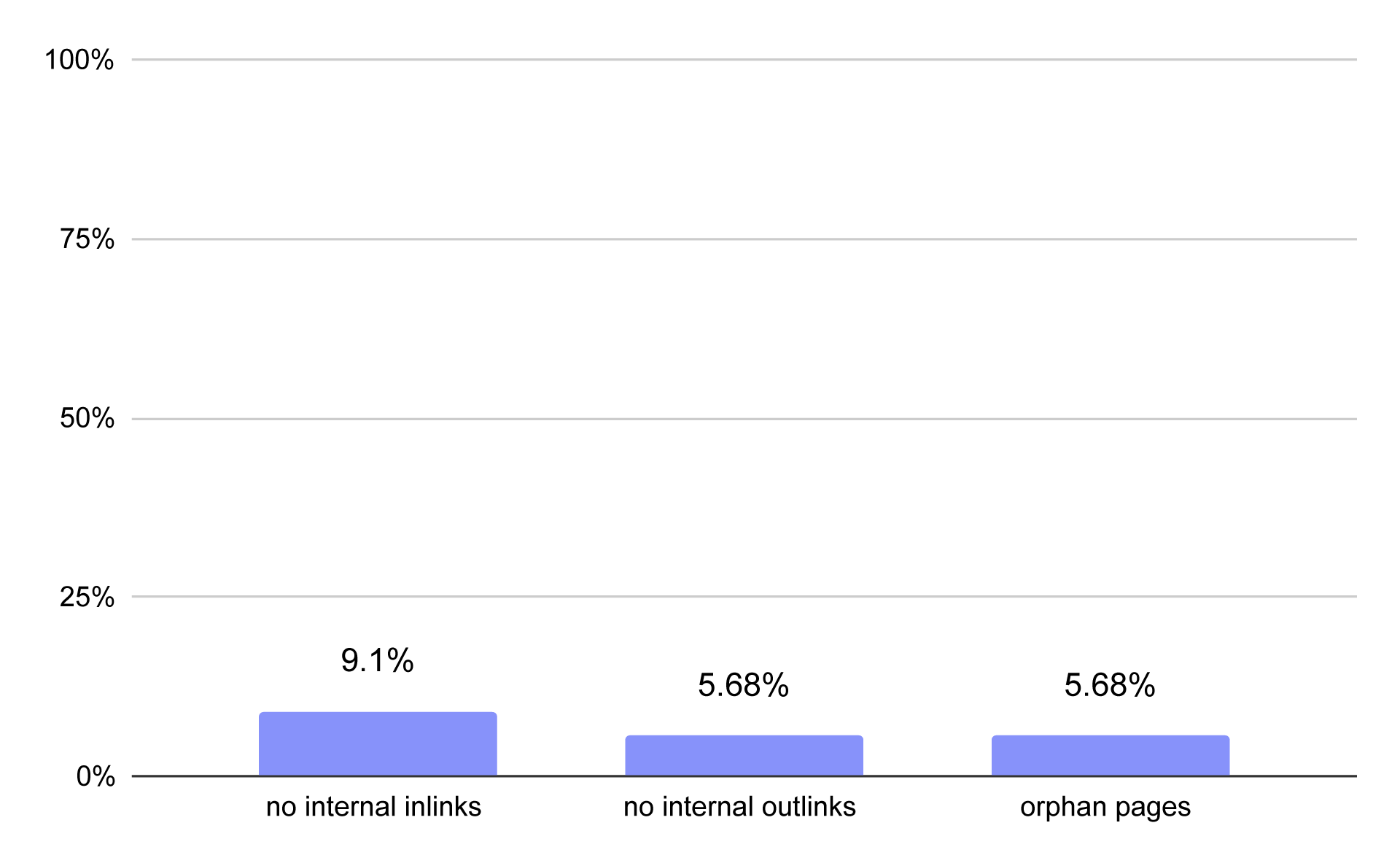
Pages without inlinks, pages without outlinks, and orphaned pages on small business websites
In our study, 9.1% of small business pages had no internal inlinks, making them effectively invisible to crawling bots. About 5.68% of pages had no internal outlinks, which negatively affected PageRank, and another 5.68% were complete orphans.
Indexability – can your page be indexed?
The next step in the technical SEO checklist is indexability. But what exactly is indexation?
Indexation is the process by which a search engine adds a page to its database after a crawler visits and analyzes it. Only pages that are in the index can appear in search results.
In our analysis, we only looked at pages that should be indexable. Even so, 95.4% were indexable, while 4.6% were not.
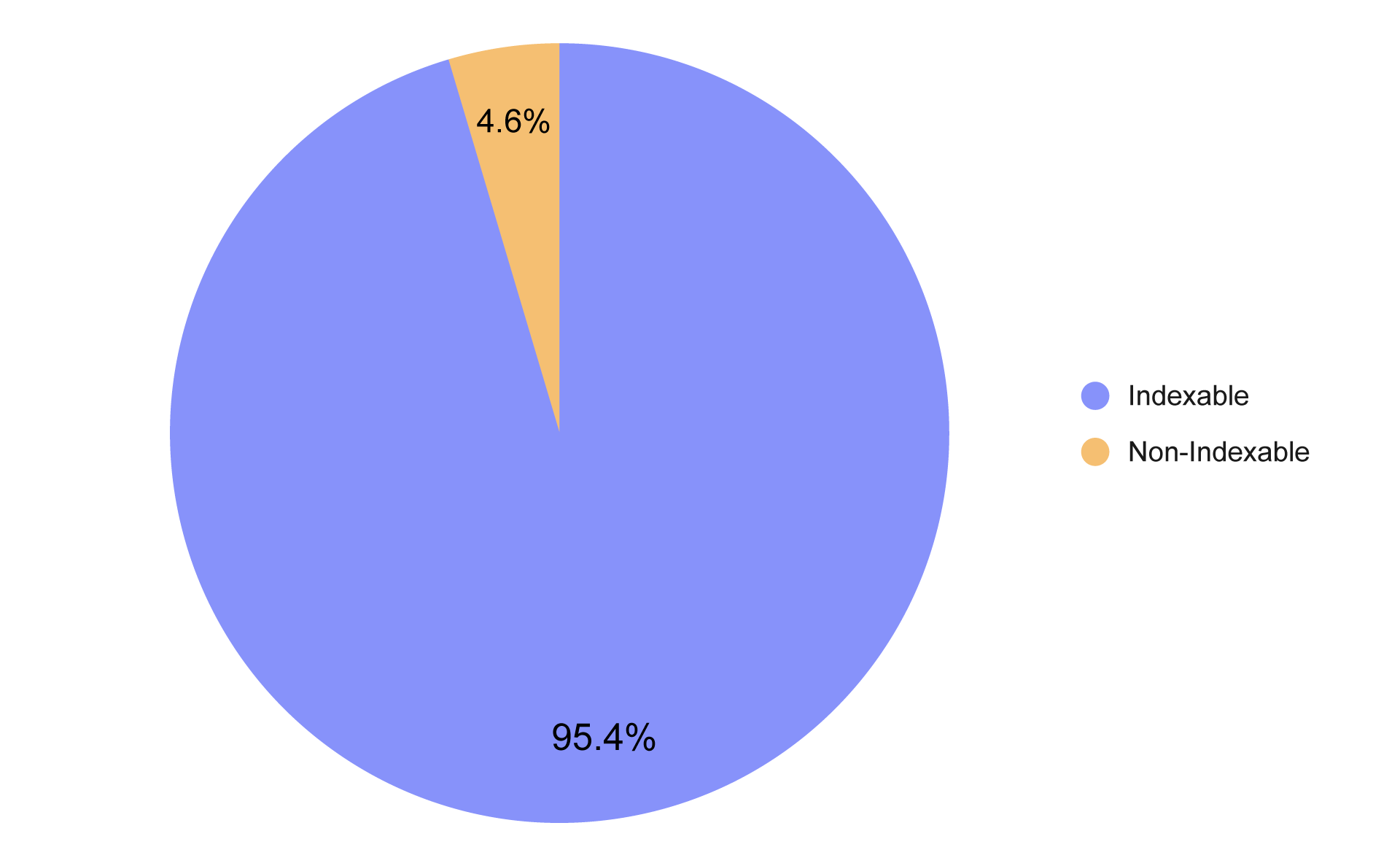
Percentage of indexable and non-indexable pages on small business websites
So how can these issues be fixed? You can intentionally prevent crawlers from indexing a page even if it’s visible in your site structure. Two HTML tags are used for this purpose: canonical and noindex. Both tags
are key elements of any technical SEO checklist.
☐ Check the noindex tags
The noindex tag tells search engines that a page should not appear in search results. Sometimes this is intentional—for example, login pages, user panels, or test pages. The problem arises when noindex is applied to important pages, like product pages, blog posts, or service pages.
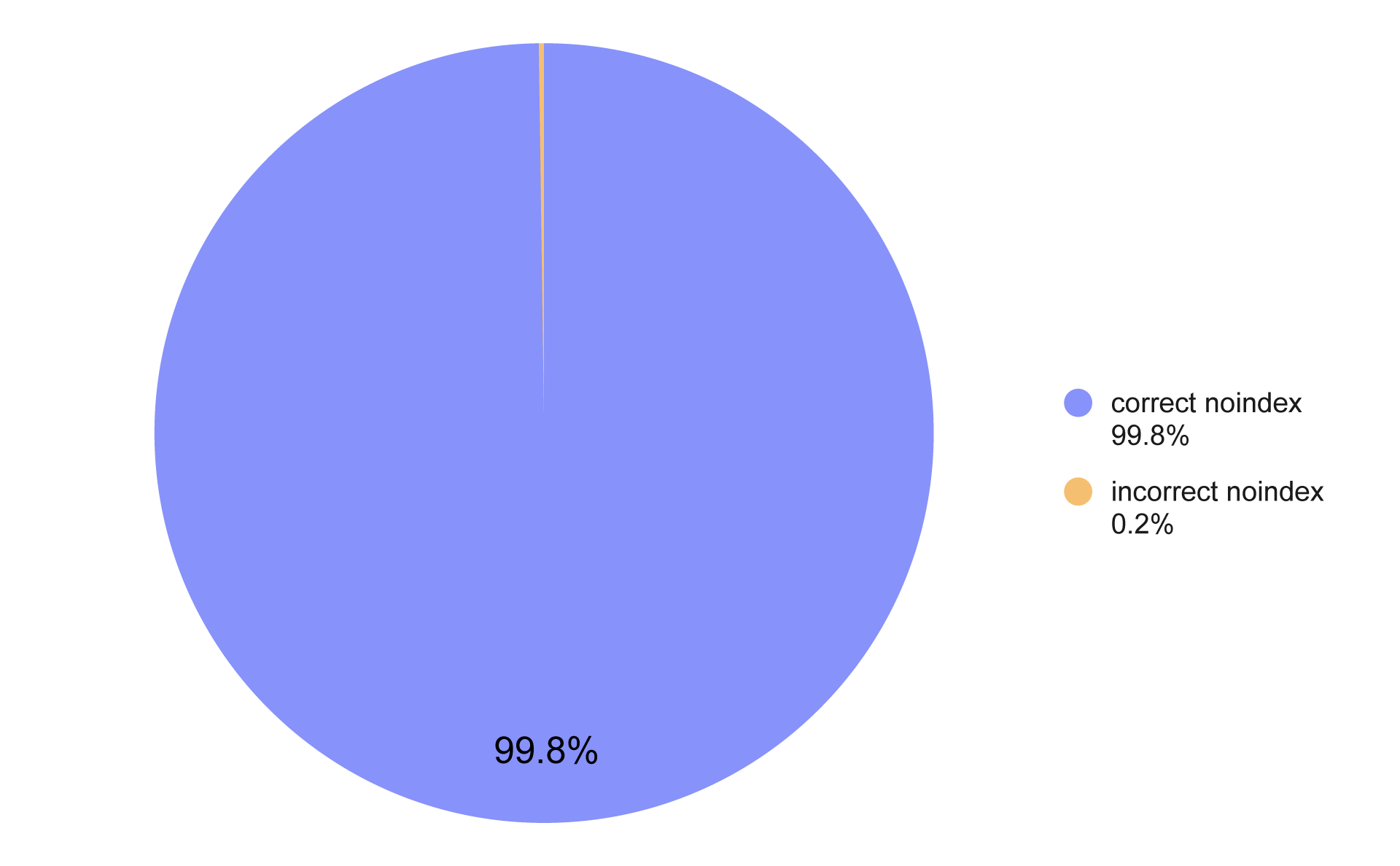
Percentage of small business pages misusing the noindex tag
Only 0.2% of small business pages with a noindex tag were using it incorrectly.
☐ Check the canonical tags
The canonical tag indicates to search engines which version of a page is the main one. It’s mainly used when there are multiple similar URLs pointing to the same content.
If the canonical points to the wrong URL, it can lead to technical SEO issues where Google indexes a different version of the page or skips it entirely in search results.

Percentage of small business pages misusing the canonical tag
As many as 10.6% of small business pages misused the canonical tag. Common mistakes include:
- Canonical pointing to an incorrect or broken URL
- Canonical pointing to a noindex page
- Self-canonical applied unnecessarily
Site architecture – is the structure logical?
Site architecture is a crucial part of on-site SEO because a clear and logical structure not only helps search engines crawl the site efficiently but also improves user experience.
☐ Check if you’re not overcomplicating things
Make sure your URLs are short and descriptive, for example /services/ websites instead of /page?id=123&ref=abc.
Avoid excessive parameters or unusual characters that make it harder for Google to understand your structure.
Maintain a logical folder hierarchy – important pages should be as shallow as possible so they’re easy to access for both users and crawlers.
Check that every page has meaningful inlinks from other parts of the website – orphaned pages lose visibility.
How did the small business websites we studied handle this?
As a benchmark, we analyzed URL structure and folder depth:
- Logical URL structure – URLs should be short, descriptive, and predictable, without unnecessary parameters or strange characters.
- Folder depth – Pages buried too deeply in subfolders are harder for both Google and users to reach.
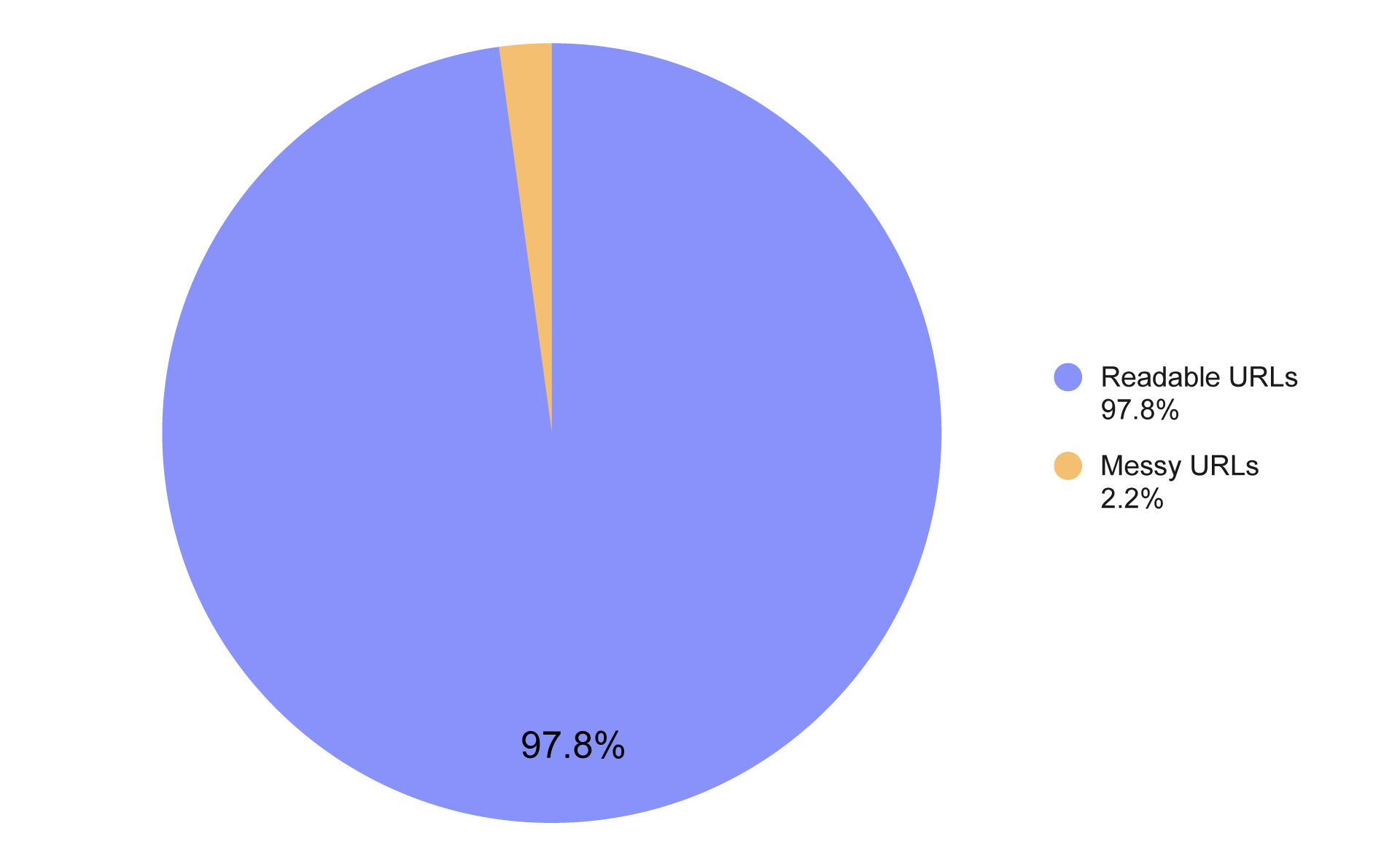
Percentage of small business websites with readable vs. messy URLs
In our dataset, 97.8% of the analyzed U.S. small business websites had readable, logical URLs, while only 2.2% qualified as messy or non-readable. This shows that most businesses take care of their URL structure, which supports both SEO and user experience.
On-Page technical signals
Another section of our technical SEO checklist focuses on signals present directly in the page’s code. Many of these elements may seem minor, but missing or misconfigured signals can make it harder for search engines to correctly interpret the page.
☐ Check the page title
Every page should have a page title. And there should only be one.
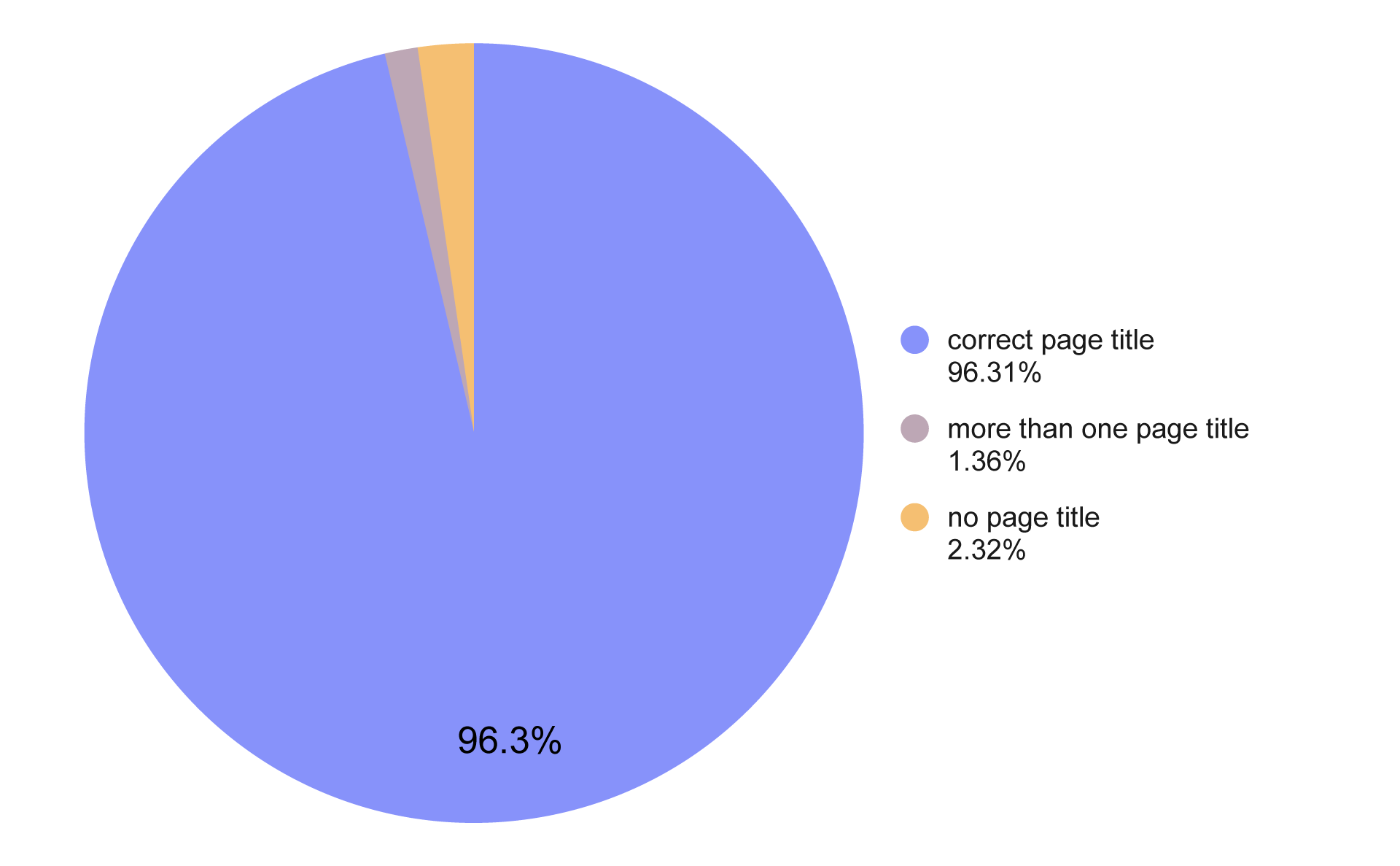
Presence of page titles on small business websites
Among the analyzed small business websites:
96.31%of pages had a correct page title.1.36%had more than one page title.2.32%had no page title at all.
Title length also matters for on-site SEO:
- <30 characters – the title is too short. It does not directly affect technical SEO, but as a simple heuristic it usually means there isn’t enough information in the title to support content SEO.
- 30–60 characters – optimal title length.
- 60–70+ characters – too long. Google will likely truncate it.
Search results typically display about ~580–600 px, which translates to roughly 55–60 characters, depending on the letters used.
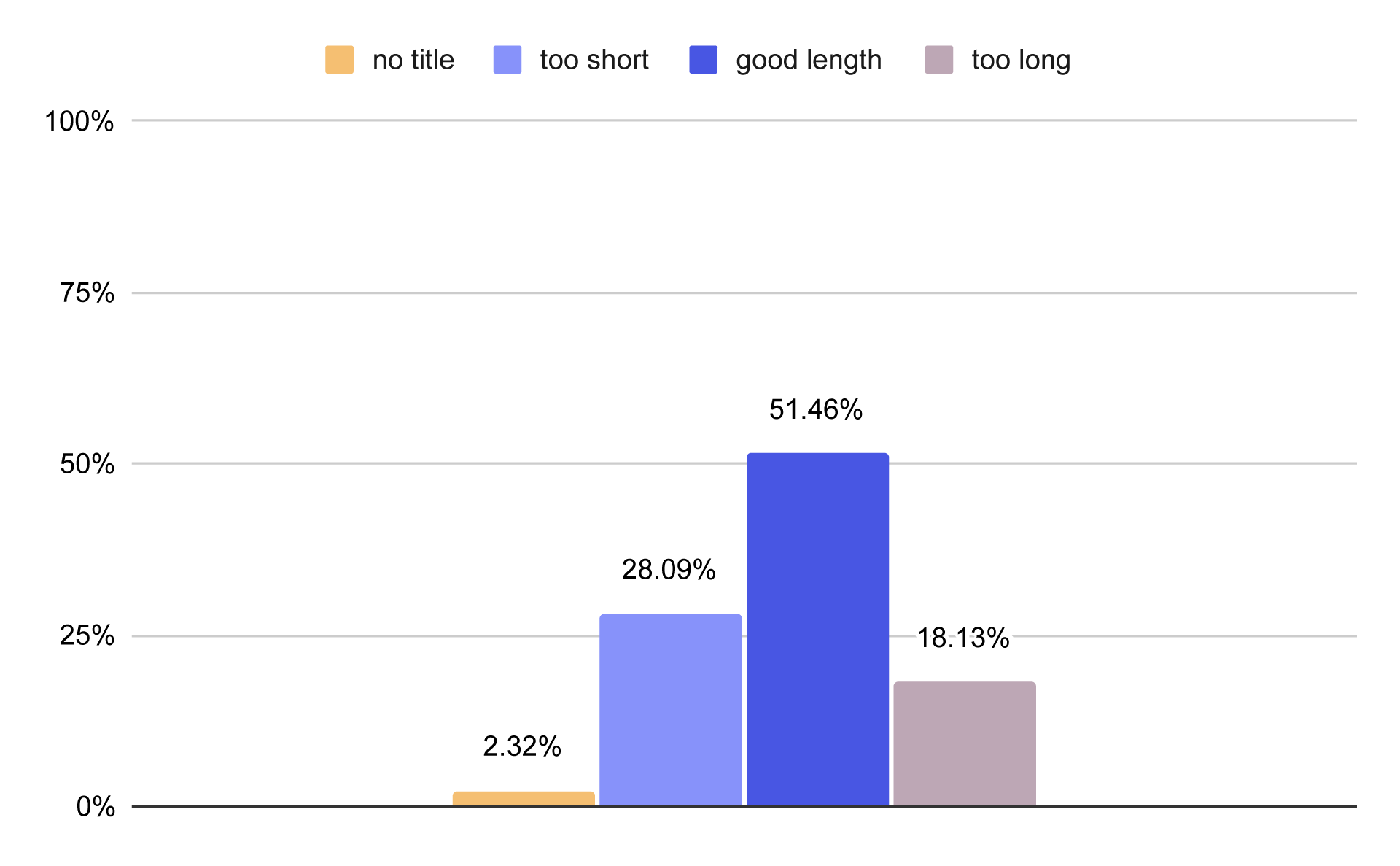
Page title length on small business websites
Among the small business websites we analyzed:
2.32%had no page title28.09%had titles that were too short51.46%had optimal titles18.13%had titles that were too long
☐ Check the meta description
A meta description is a short description of the page written in HTML code that summarizes its content. It provides quick context before someone clicks the search result.
Although search engines primarily analyze the page content itself, meta descriptions still play a supporting role in on-site SEO because they can:
- reinforce the topical context
- include important keywords
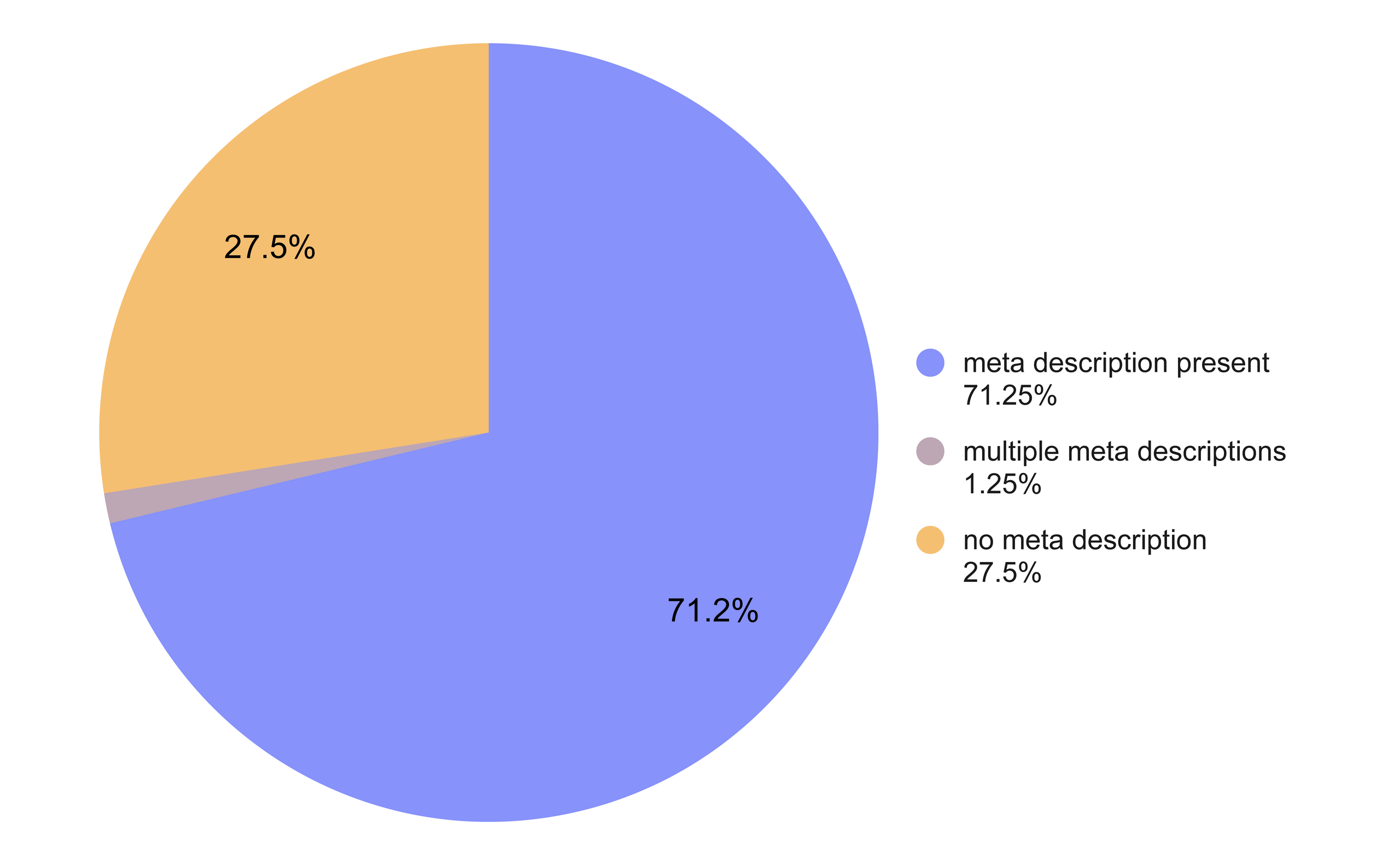
Presence of meta descriptions on small business websites
Among the analyzed small business websites:
27.5%had no meta description1.25%had two meta descriptions (incorrect configuration)71.25%had a correctly implemented meta description
These are relatively weak results.
Just like page titles, meta descriptions should also stay within a reasonable length range.
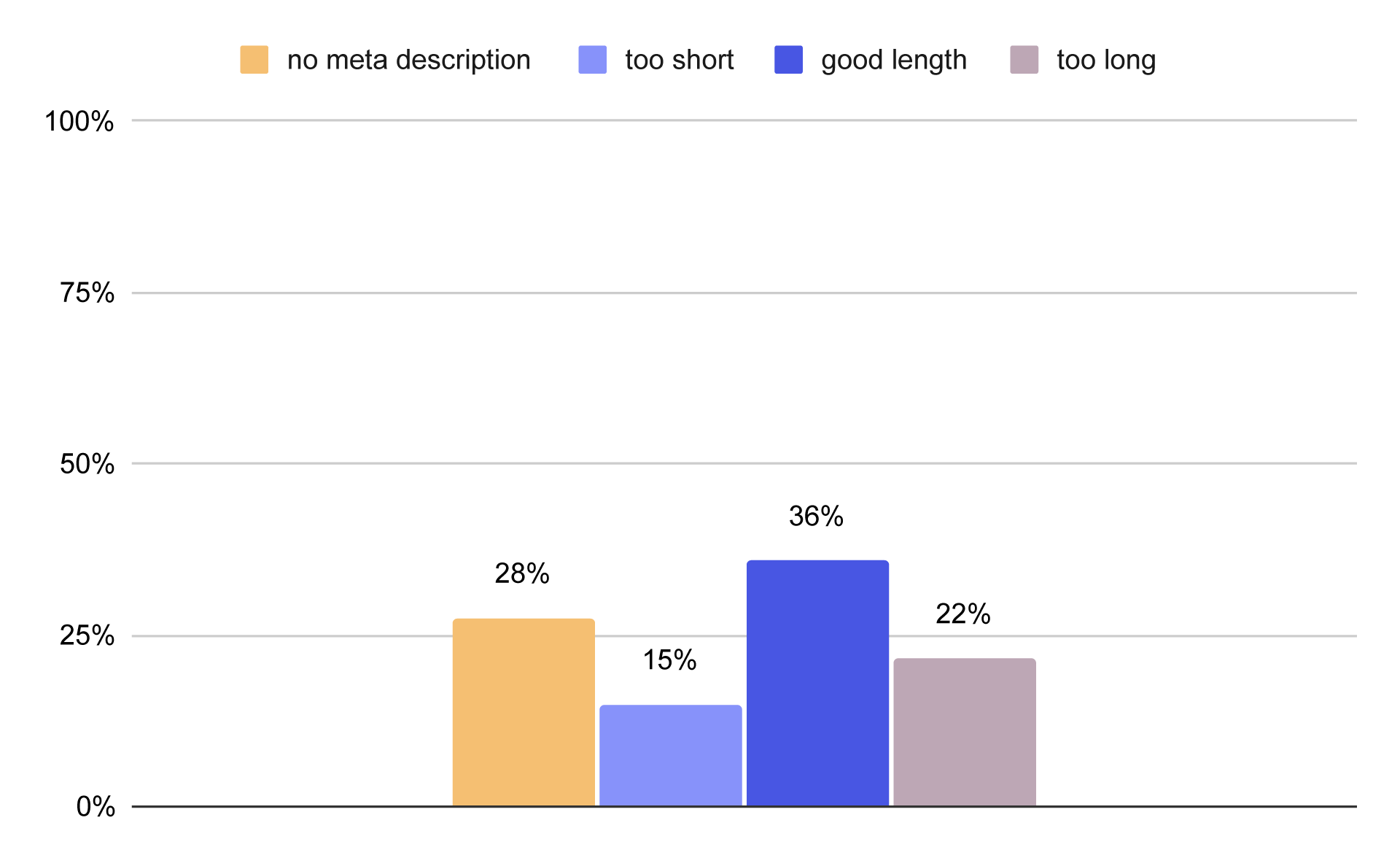
Meta description length on small business websites
Among the analyzed websites:
27.53%had no meta description28.09%had descriptions that were too short35.9%had optimal length21.64%had descriptions that were too long
☐ Check the heading structure
Heading structure defines how content is organized in HTML using H1–H6 tags.
A correct structure means that:
- the page has one H1 heading describing the main topic
- sections are marked with H2 headings
- subsections use H3 and lower levels
- headings form a logical hierarchy of content
For on-site SEO this matters because headings help search engines understand the structure and topic of a page.
Errors such as a missing H1, duplicate H1s, or chaotic heading hierarchy can make it harder for crawlers to interpret the page.
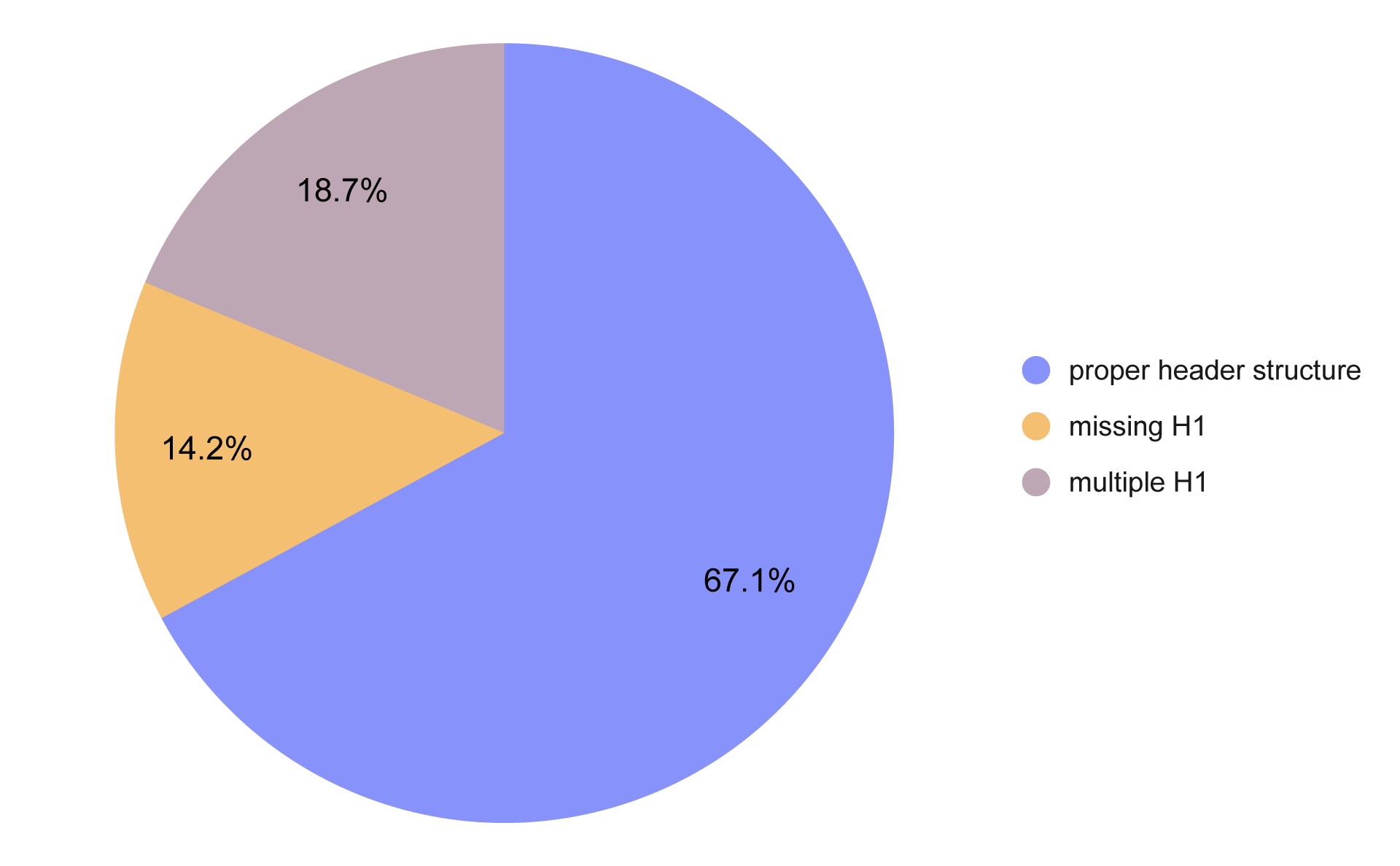
Correct vs incorrect heading structure on small business websites
Among the analyzed pages:
67.1%had a correct heading structure32.9%had structural issues
Among the incorrect cases:
14.2%had no H1 but used lower-level headings18.7%used multiple H1 headings
☐ Check the lang attribute
The lang attribute specifies the language of the page or part of the page in HTML. It is usually placed in the tag.
Although it is not a strong ranking factor, it is still part of proper website configuration. It helps search engines understand the language of the content and allows browsers and assistive technologies to display or read it correctly.
Common mistakes include:
- missing lang attribute entirely
- language set incorrectly for the page content
- non-standard values such as lang="english"
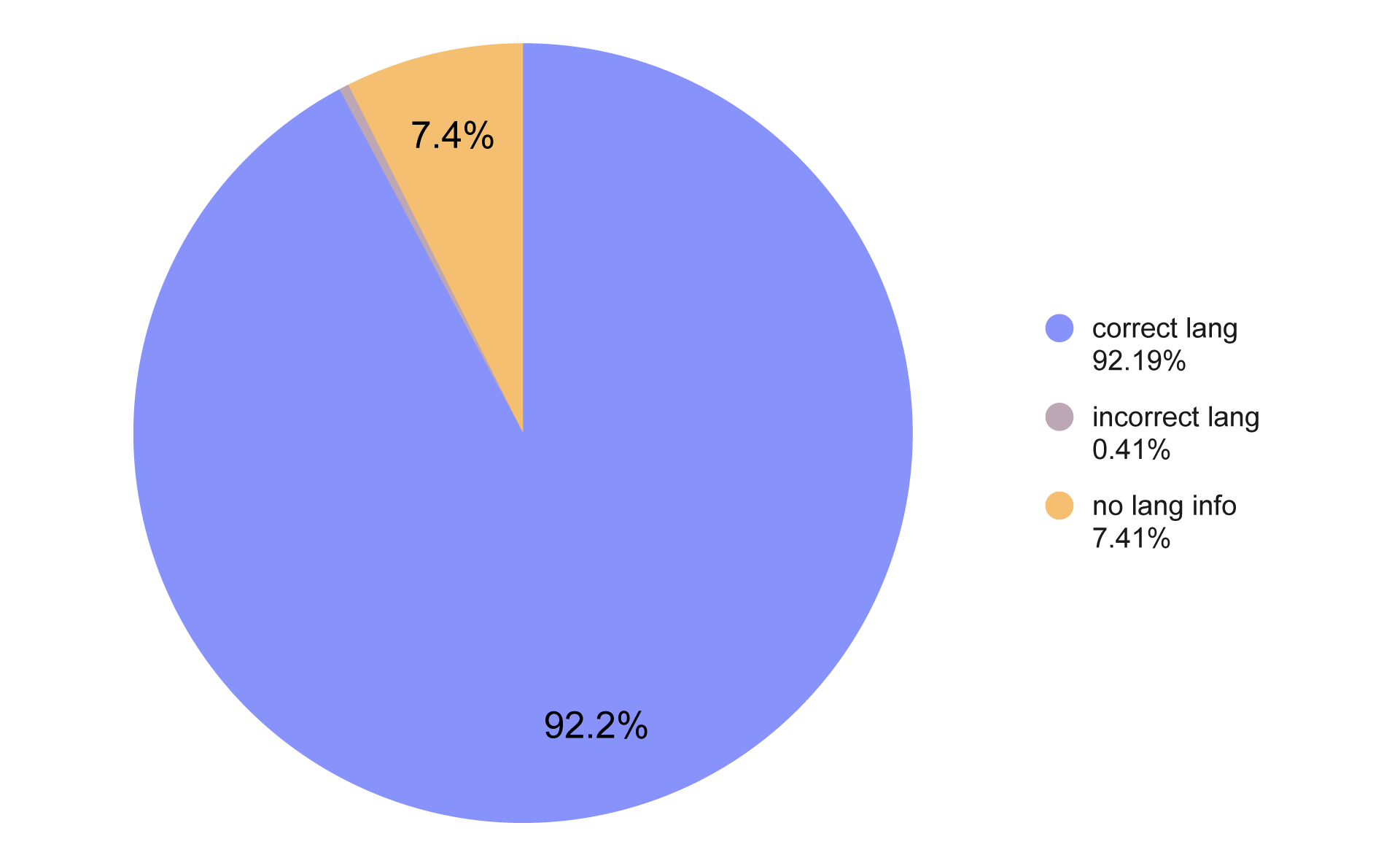
lang attribute usage on small business websites
In our dataset:
92.2%had the correct lang attribute7.41%had no lang attribute0.41%had an incorrect value
Most sites get this right, but the missing lang attribute is such an easy fix that it’s surprising to still see it.
☐ Check if the website uses a secure URL version
Secure HTTPS is now the standard for every website. It not only protects user data but is also a ranking factor in Google. Websites running on HTTP may be considered less trustworthy and can trigger browser warnings.
For a website to be properly secured:
- it must have an active SSL certificate
- all pages should redirect from HTTP to HTTPS
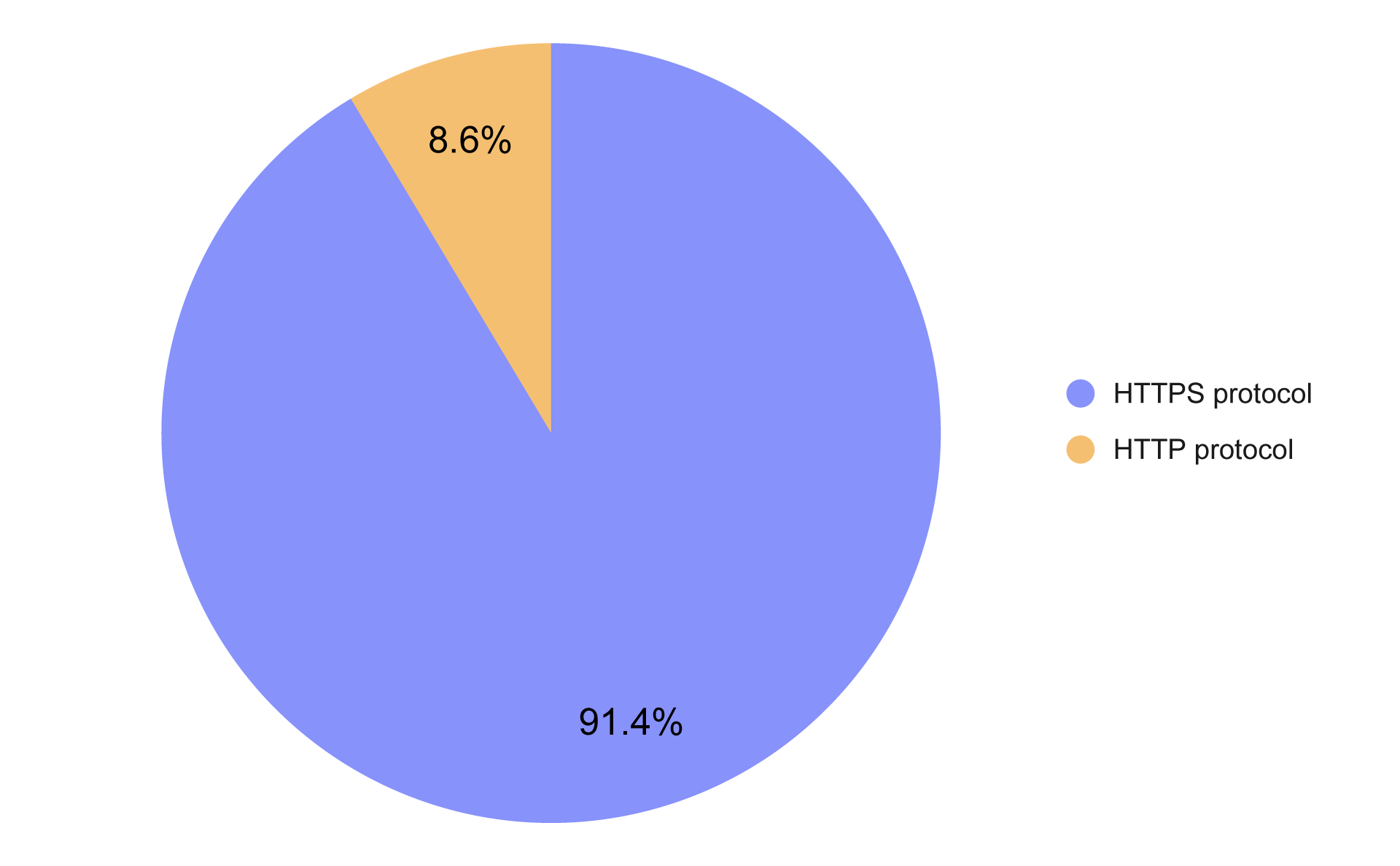
HTTPS vs HTTP protocols on small business websites
According to our research, 91.4% of small business websites in the U.S. use HTTPS. However, there are still cases where pages redirect back to HTTP or where the canonical tag points to the insecure version.
Such mistakes can create technical SEO issues where Google treats different versions of a page as duplicates and dilutes link value.
Performance & mobile
Website speed and mobile performance are also important parts of any technical SEO checklist. Search engines evaluate not only the content and structure of a website, but also how quickly it loads, how stable it is while rendering, and whether it works well on mobile devices.
☐ Check page speed and other performance metrics
When working through a technical SEO checklist, tools like Google Lighthouse help identify performance issues. It calculates a PageSpeed score (rating the page on a scale from 0 to 100) and measures several performance metrics that influence the final score.
Score interpretation:
- 90–100: Excellent
- 50–89: Average
- 0–49: Poor

Average PageSpeed score on small business websites
In our dataset, small business websites scored 78 on desktop and 59 on mobile on average. We also published a separate blog post that explores these results in more detail.
Use solutions that follow best practices
Our technical SEO checklist may seem long, but it helps identify and fix common technical SEO issues. And indeed, businesses find technical SEO difficult to get right - the research results show that small businesses do not handle it perfectly:
- Crawlability: 9.1% of pages lacked internal inlinks, making them difficult for bots to discover; 5.68% had no internal outlinks, which affects PageRank.
- Indexability: 95.4% of pages were indexable; improper use of canonical tags affected 10.6% of sites, while only 0.2% misused the noindex tag.
- Site Architecture: 97.8% had clear, readable URLs, supporting both SEO and user experience.
- On-Page Signals: While most pages had correct titles (96.3%) and language attributes (92.2%), 27.5% lacked meta descriptions and 32.9% had issues with header structure.
- Security: 91.4% used HTTPS, but many still had redirect or canonical issues.
- Performance: the average PageSpeed scores were 78 for desktop and 59 for mobile, indicating significant room for improvement.
Most websites on the internet are not built from scratch. They are created using ready-made tools, and many elements covered in a technical SEO checklist depend on the tools used to build the site. By using our solution, you won’t have to worry about painstakingly checking every point on the checklist - our website builder takes care of things such as proper header hierarchy and performance optimization.
👉Try IKOL for free👈 and see how many fewer things you’ll have to worry about.
The data and statistics presented in this blog post come from a research study conducted by IKOL between 2023 and 2026. To learn more about IKOL research methodology and explore other findings, visit: ikol.com/research