How to Write SEO Content to Rank High in Search Results?

Search Engine Optimization - you kind of know what it is, but not really. A somewhat mystical concept connected with visibility on the internet. Some stuff about keywords, some stuff about how pages rank in search results.
Is SEO actually that vague? Yes and no. Google doesn’t reveal the full ranking algorithm - it’s their business secret. But we do have fairly strong hints and confirmed ranking factors from Google’s documentation, patents, and SEO research.
In this article we’ll explain how to write SEO content and show a few statistics from our own research on small business websites in the US, so you can learn how to effectively outrank competitors with content SEO.
What is content SEO?
In the previous post from our SEO series we talked about the technical side of SEO - making sure a website is configured properly so bots can read it without any problems. Now we’ll focus on the content itself, which means content SEO.
Once a bot lands on a page, it starts by analyzing what the page is about - its topical relevance. Then it evaluates the quality of the content and, by comparing it with other pages, determines where it should rank in search results.
The brutal definition:
Content SEO is about creating content whose quality will be rated as highly as possible by the bot.
But rated based on what?
Topic and content strategy
- Choosing keywords and related phrases (main + long-tail keywords)
- Matching the content to user intent (informational, transactional, navigational)
- Topical completeness and logic - whether the page fully answers a given topic
- Semantic connections - synonyms, natural context, and logical links between sections and pages
Content structure
- Logical hierarchy of headings (H1 → H2 → H3)
- Bullet points, tables and graphics that make content easier to scan
- Readability (Flesch Reading Ease, average sentence length)
Content refresh
- Regularly adding new information, statistics and examples
- Removing outdated fragments
- Adding new sections as the topic evolves
Let's start form the top of the list.
How to develop a SEO keyword strategy?
Before you start diving into the details, it’s worth taking a step back and looking at your website holistically.
Define the main topic areas of your website and your goal
If you’re running a business, this part is fairly simple: your topic areas are your offer, and your goal is to be discovered by customers who want to pay for it.
It’s also worth identifying your competitors and looking at their websites. How do they structure their content? How are they different from yours? The goal is not to be identical, but also not completely different - you want to build your own brand while mastering how to write SEO content.
Identify keywords
Start with a brainstorming session of phrases that describe what your website is about. Think about what your potential customers might type into a search engine. From this exercise you’ll get your seed keywords.
If you want to build reach beyond local search, or if you operate in a highly competitive local SEO niche, you’ll probably need to use paid keyword tools. These tools help you identify phrases with high search volume and relatively low difficulty. You simply enter your seed keywords and explore the related keyword suggestions.
And remember: not all keywords are equal. According to SE Ranking (2025):
The majority of keywords get very little traffic, with nearly 74% having 10 or fewer searches per month.
Think about keyword intent
When people type something into a search engine, they usually have one of four types of intent:
- Informational intent: the user is looking for information, asking questions like “what is this?" or “how do I do it?" Example: how to write SEO content
- Commercial intent: the user is comparing solutions. Example: best website builder for small business
- Transactional intent: the user wants to make a purchase. Example: business website price
- Navigational intent: the user is looking for a specific brand or website. Example: IKOL login
According to SE Ranking:
Among searchers, 70% have informational intent, 22% commercial intent, 7% navigational intent, and 1% transactional intent.
Depending on which page of your website you’re writing, you’ll need to target different types of intent.
A homepage usually targets navigational keywords (your brand name) or broader commercial phrases (for example CRM for small business).
Product or service pages mostly focus on commercial and transactional keywords.
Most blog articles target informational queries (for example how to write SEO content), although formats like product comparisons or guides can also target commercial intent (for example best website builder for small business).
How to write SEO content?
Alright, we know why we’re writing content and what our keywords are. Time to actually start writing.
Let’s begin with a fairly obvious question:
How many words should a page have?
There’s no single correct answer. What we do know is that a page should probably not have fewer than 200–300 words, because that’s usually too little semantic context for search bots. A page should contain enough content to fully answer the user’s query, and that depends largely on search intent.
Typical ranges look like this:
- Homepage: about 300–1000 words
- Service / product page: about 500–1200 words
- Blog post: about 1200–2500 words
We checked how homepage content looks across small business websites in the US. The results were as follows:
37.04%have fewer than 300 words on the homepage, which may not provide enough context for bots to clearly understand what the page is about45.89%have between 300 and 1000 words, which is a reasonable range for a homepage17.07%have more than 1000 words, which is generally more than necessary for a homepage
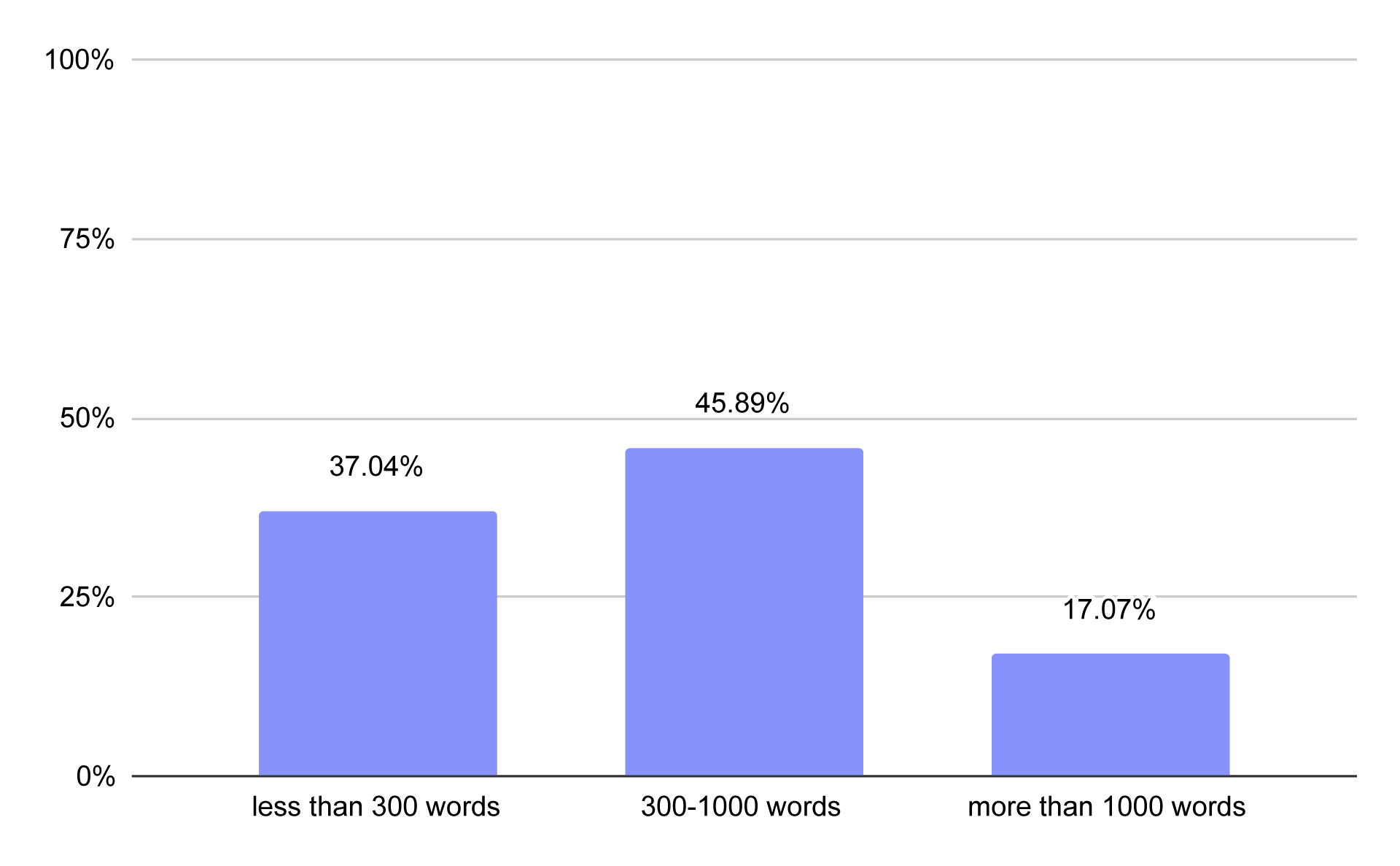
Number of words on business homepages
We also looked at the average word count. On average, small business homepages in the US contain 662 words.
Broken down by business type:
- Service businesses:
697words on average (a typical amount - enough to introduce the company and outline what it does) - Online stores:
844 words(the highest average, likely because featured products often appear on the homepage) - Restaurants:
406 words(lower, because menus are usually on separate pages and the homepage only needs a short introduction) - Personal websites & portfolios:
409 words(also lower due to their simple, presentation-style nature)
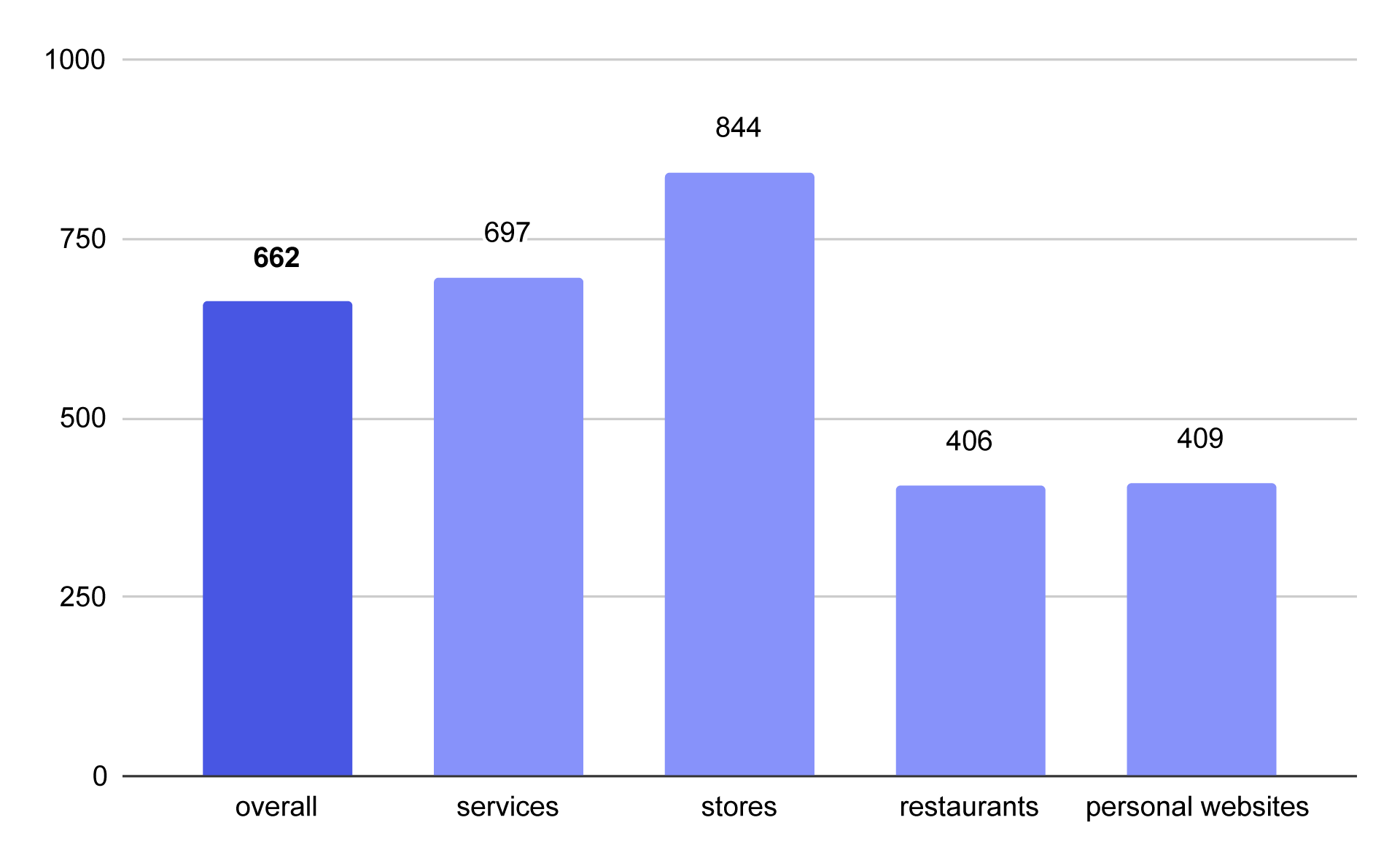
Average number of words on homepages across different types of businesses
How to use keywords for SEO
Now that we’ve chosen our keywords, the next question is: where and how should we use them in the content?
A few years ago SEO often meant simply repeating keywords throughout the text. Today Google’s algorithms analyze semantic context, so that approach not only doesn’t help - it can actually hurt.
A good practice is to use the main keyword in several key places:
- in the page title
- in the first paragraph
- in one of the headings
- naturally throughout the article
- in internal link anchors
But this doesn’t mean repeating the exact same phrase over and over again. One key part of learning how to write SEO content is using semantic variations of your main keyword. If the main keyword is SEO keyword strategy, the text may also include phrases such as:
- keyword strategy for SEO
- how to choose SEO keywords
- keyword research strategy
- long-tail keywords
This helps the content cover the topic more broadly and makes it easier for Google to understand the page’s topical relevance.
How many keywords should a page target?
A common mistake is trying to target too many keywords on a single page.
In practice, a simple model works best:
- 1 primary keyword
- 3–8 related keywords
The primary keyword determines the page's main topic while related keywords expand it. If a page uses multiple primary keywords in an attempt to rank for several unrelated topics simultaneously, then Google may be unable to select the searches it should appear for.
For this reason, dedicating each page to a single particular topic yields better results than fitting everything into a singular page.
What's the optimal keyword density?
First, let's clarify what keyword density is and how to calculate it. Imagine a 1000-word article, where your keyword shows up 10 times. In this example, the keyword density is 1%.
A density between 0.5% and 1% usually looks natural. At 2–3%, it may start looking like keyword stuffing, which should be avoided. Search bots can recognize it and may rate the content quality lower.
It’s not calculated purely mechanically though. As you have just learned, Google also checks for context and synonyms.
Here's a rough guideline to follow:
For each 1,000 words, you can insert:
- Your primary keyword from 5 to 10 times
- Each secondary keyword up to 3 times
The trick is to provide content that reads naturally while ensuring that the keyword density remains balanced throughout the entire text.
What to keep in mind about SEO UX - or SXO?
So far we’ve talked a lot about bots, but what about real users?
Well, bots also take into account user experience signals, such as:
- Core Web Vitals (we covered some of these in the blog about performance analytics)
- Mobile usability (more on the technical SEO side)
- Dwell time and other signals showing how users actually interact with the page
- Readability of the content
This is where SXO (Search Experience Optimization) comes in - it’s basically SEO + UX. It’s not enough to rank for keywords; your content also needs to be easy to scan and helpful, and keep users engaged, so they actually stay, click, and convert. SXO principles directly affect how to write SEO content that both bots and humans prefer.
Since we’re talking about content writing, let’s pay closer attention to readability. Easy-to-read content keeps visitors engaged longer, lowers bounce rates, and makes information accessible to a wider audience - including people on mobile devices or with limited time.
Your content can become more readable through:
- Short, focused paragraphs
- Short sentences
- Headings that break up text
- Bullet points and lists
- Simple language
How readable are small business websites in the US? We looked at several metrics to find out. First up: average words per sentence on homepages:
- All businesses: 18 words per sentence
- Service businesses: 18
- Stores: 18
- Restaurants: 20
- Personal websites: 16
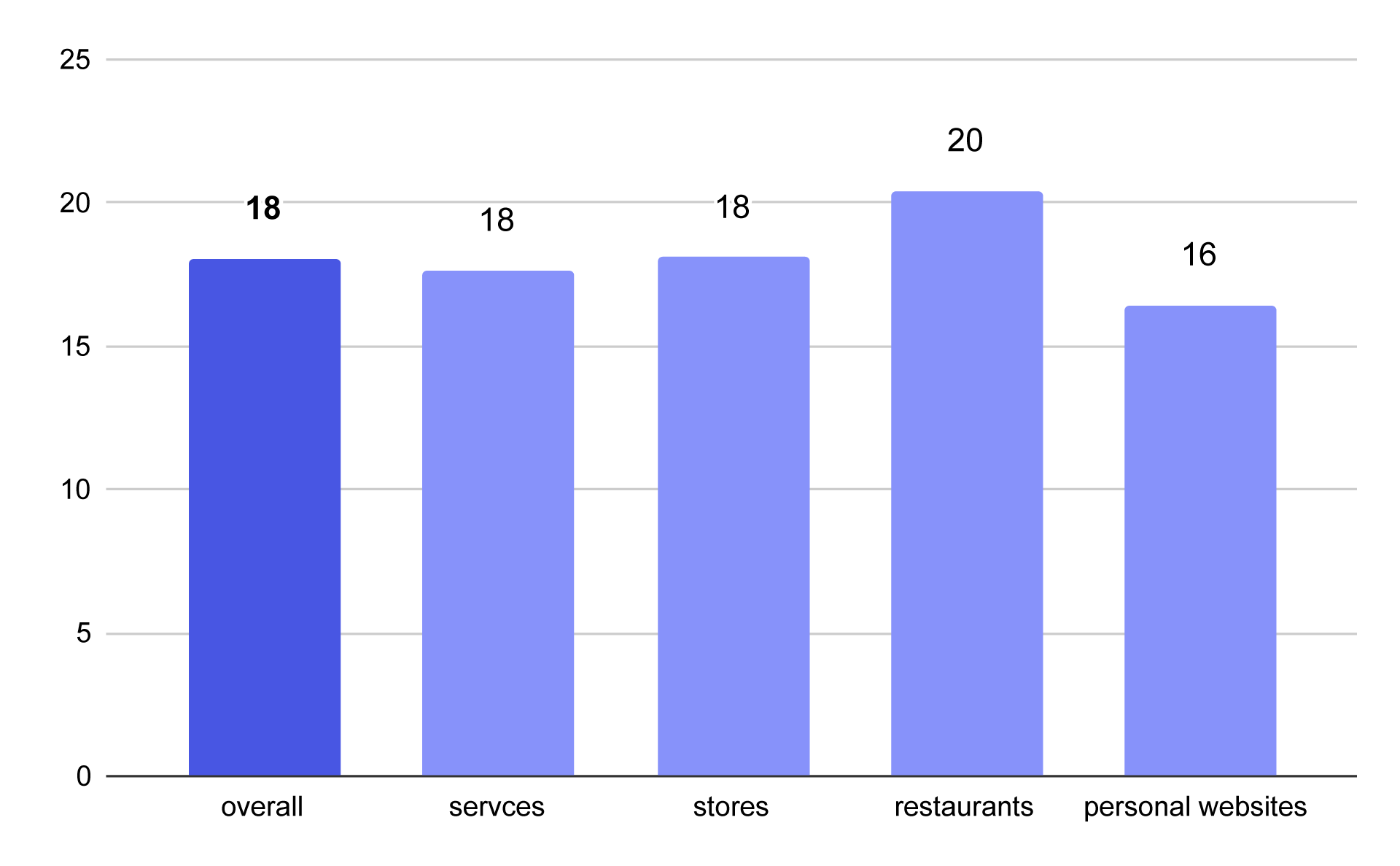
Average words per sentence on homepages across business types
How does this translate? Typical readability levels:
- 10–15 words per sentence → very easy
- 15–20 → good readability (recommended for most sites)
- 20–25 → medium difficulty
- 25–30 → hard
All types of business homepages mostly fall into the sweet spot. Restaurants had slightly longer sentences, portfolios slightly shorter.
Words per sentence alone isn’t enough. Flesch–Kincaid Reading Ease is more sophisticated - it looks at sentence length and word complexity (more syllables = harder to read).
| Flesch Reading Ease | rating | found in |
|---|---|---|
| 90–100 | very easy | simple marketing, short ads |
| 80-90 | easy | light marketing, B2C landing pages |
| 70–80 | fairly easy | blog articles, popular guides |
| 60-70 | normal | standard business content |
| 50-60 | fairly hard | expert or technical content |
| 30-50 | hard | industry documentation |
| 0-30 | very hard | specialist or academic texts |
The majority of content aims for 60–80 Flesch points. We will see businesses mostly keeping their material written in a language that's accessible to most users but with a slight professional tone. In our research, we have found out that just over half of business websites have followed this practice, as their homepages fall within this optimal range.
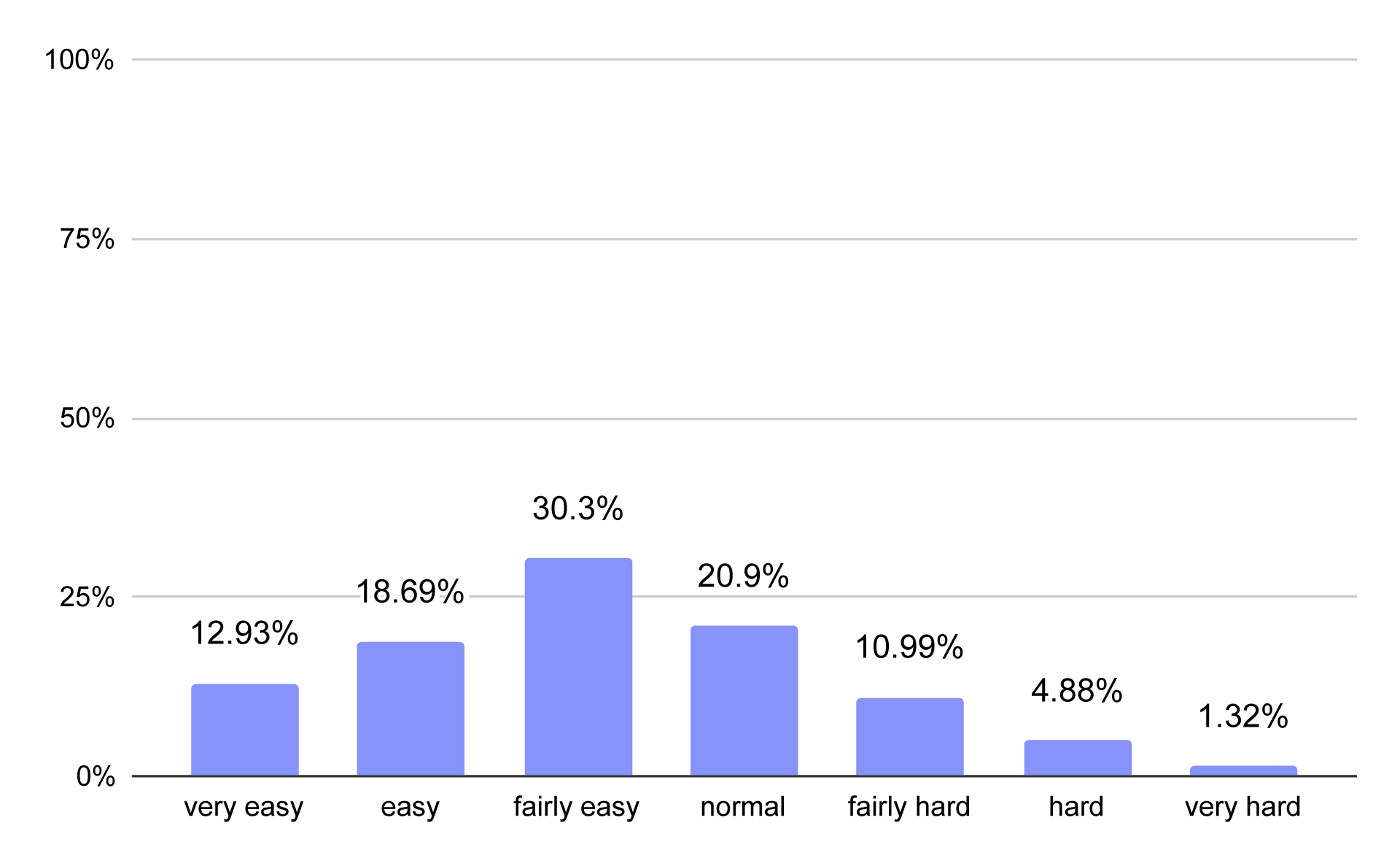
Percentage distribution of business websites across different readability difficulty levels
12.93% of business homepages were very easy to read
18.69% were easy to read
30.3% were fairly easy to read
20.9% had normal readability difficulty
10.99% were fairly hard to read
4.88% were hard to read
1.32 % were very hard to read
The average score was 73 on the Flesch–Kincaid Reading Ease scale. For service business sites it was 71, for online stores 84, for restaurants 77, and for personal websites 65.
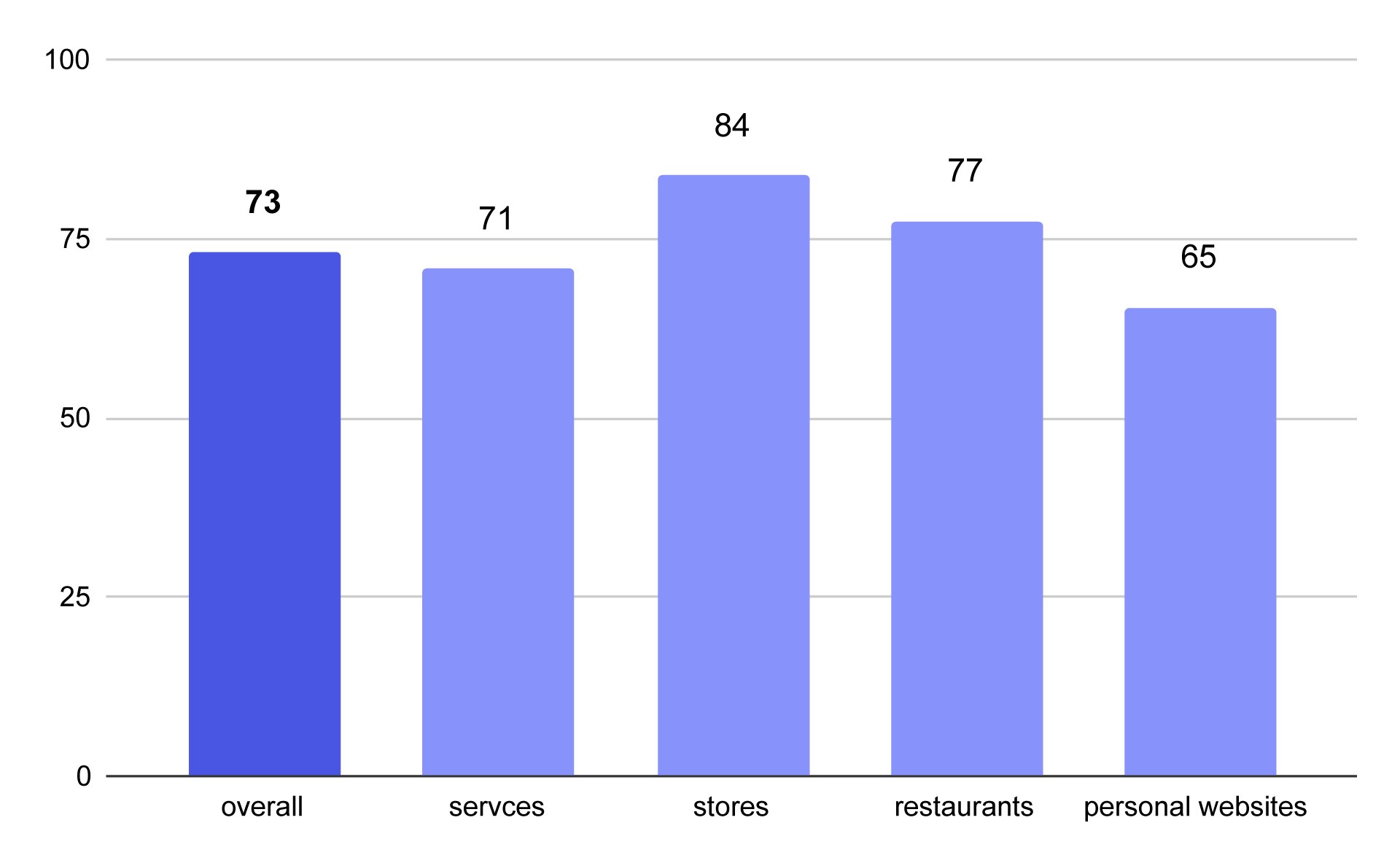
Average Flesch Reading Ease score on homepages by business type
What could explain these differences? Let’s check which industries scored the lowest and the highest.
Hardest to read sites:
- Private investigators: 50
- Speech therapy: 53
- Researcher: 53
- IT development: 55
- Marketer: 57
Content from these service businesses is harder to read due to more frequent usage of advanced vocabulary, needed to build credibility and explain complex processes in more detail. This combined with lengthy words such as "investigation", "development" or "therapeutic" results in longer sentences.
Easiest to read sites:
- Houseware stores: 97
- Boat & marine supplies: 90
- Chicken restaurants: 90
- Asian restaurants: 90
- Artisan & craft store: 89
Stores and restaurants rely on short marketing messages and product lists. Words are often short and regularly used in daily life (“menu", “food", “shop"), forming easy and quick to read sentences.
Should we always strive for the highest possible readability? In most cases, yes, but you shouldn't force it if your industry requires you to communicate through specialized terminology.
Publishing, monitoring, and maintenance
Okay, we know how to write content, now there’s one crucial question – how do you make sure you don’t lose all the work you’ve done?
Let’s start with consistency – Google likes it when new content appears on your site. According to Orbit Media (2025):
48% of marketers publish new content 2–4 times per month.
After publishing, check if your new content is indexed. Track its performance thoroughly– does it appear for your intended keywords? Or perhaps some unintended ones? How many impressions and clicks does it score? The more you realize how keywords affect your Google ranks, the better your SEO content will become.
On top of regularly adding new content, you should also update your existing content. Google highly values currently relevant information, and places pages with the most recent data higher in search results. Such SEO improvements also keep the users engaged.
Good SEO content answers questions better than your competitors
You may have been browsing through countless SEO guides, and getting to the conclusion that it’s all just tricks. The perfect number of keywords, text length, headline placement and wording, and so on. In reality, SEO content is simpler. Except not exactly.
For each query, Google needs to answer one simple question itself: which page matches best?
That’s why effective SEO content follows a few simple rules:
- clear keyword strategy
- alignment with search intent
- complete answers to the topic
- readability and good UX
- regular updates
Our analysis of small business homepages in the US proves that many sites still struggle with the basics. Some have too little content, some have too much of it, and some don’t use keywords effectively.
This is where platforms like IKOL come in. With tools for website building, content management, and AI generation, they allow everyone to create and update SEO-friendly websites. You no longer need a full marketing team or multiple software - all these features are available in one place and simple to use.
👉Try IKOL for free👈 and enter the SEO game with ease!
The data and statistics presented in this blog post come from a research study conducted by IKOL between 2023 and 2026. To learn more about IKOL research methodology and explore other findings, visit: ikol.com/research