What Makes a Good Website Navigation?
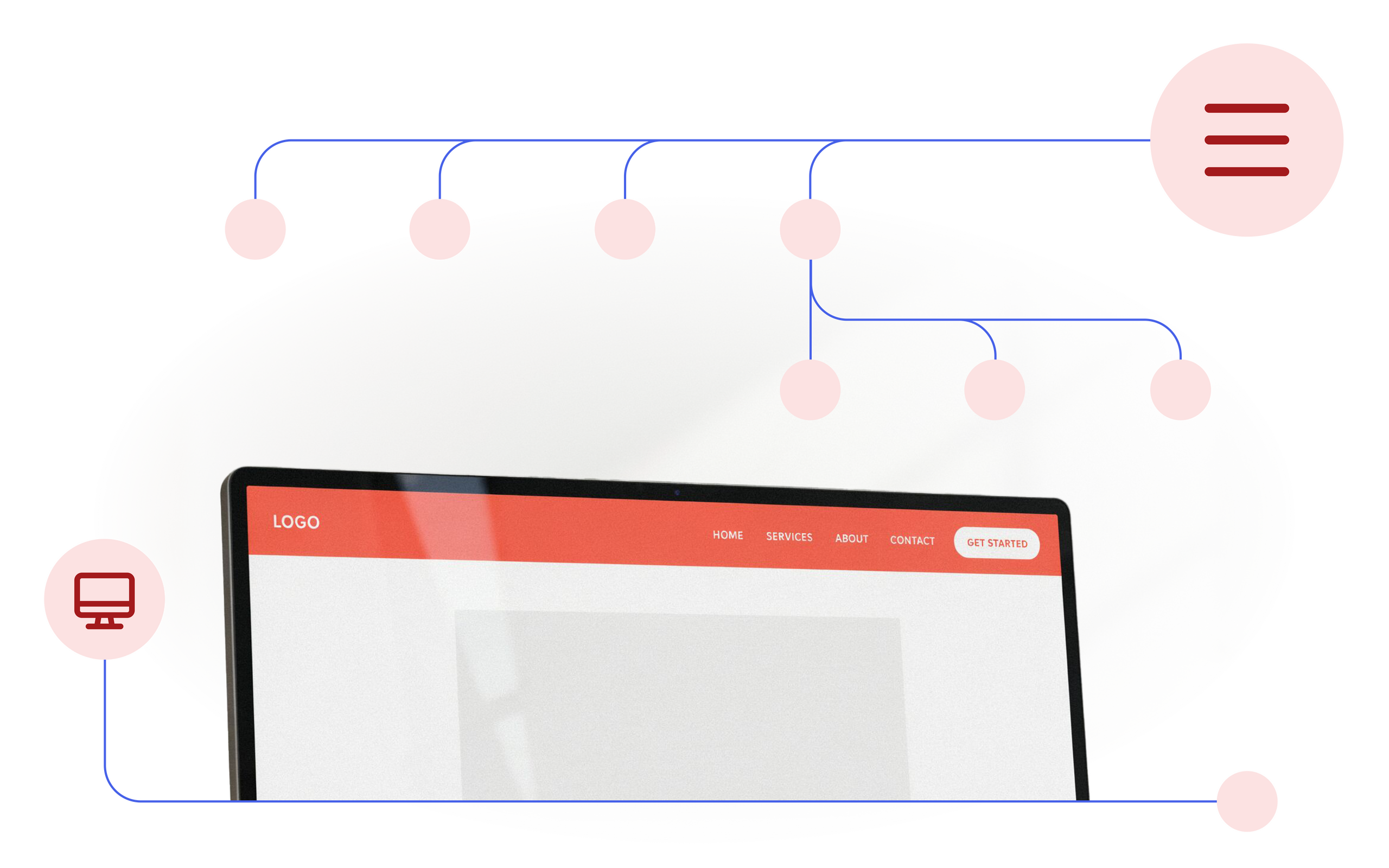
Website navigation is the main menu, usually located at the very top of the page with links leading to various subpages. It is actually the most important element on the entire site. Without proper navigation, users won't be able to find the content they are interested in and will likely abandon the site entirely.
To check current standards, we analyzed the navigation on over 2,700 small business websites in the US, looking at how they are built and what challenges they face.
Characteristics of good navigation
Navigation should be designed with users in mind to ensure the simplest and most intuitive browsing experience, while simultaneously encouraging conversions, such as making a purchase, sending an inquiry, or booking a service.
To fulfill its purpose, navigation should be:
- Intuitive and predictable - Users should instantly understand what to expect when they click an element (for example, knowing that a cart icon leads directly to their purchases).
- Simple and clear - Navigation should contain only the most important elements. Too many options may overwhelm users and make them leave the site before conversions.
- Action-oriented - Your primary goal is user conversion, so depending on your business, the desired action should be clearly visible to users in the form of a CTA.
- Mobile-responsive - Since the majority of web traffic comes from smartphones, it is crucial that your navigation is optimized for mobile devices (check our blog to learn more!).
How is website navigation typically built?
Structure levels
Website navigation can adopt either a single-level or multi-level structure.
A single-level structure means that the entire navigation is fully visible right away; none of the tabs are hidden, and all elements can be clicked immediately. In contrast, a multi-level structure hides some of the options. Only after clicking or hovering over one of the navigation elements does a panel expand with further options.
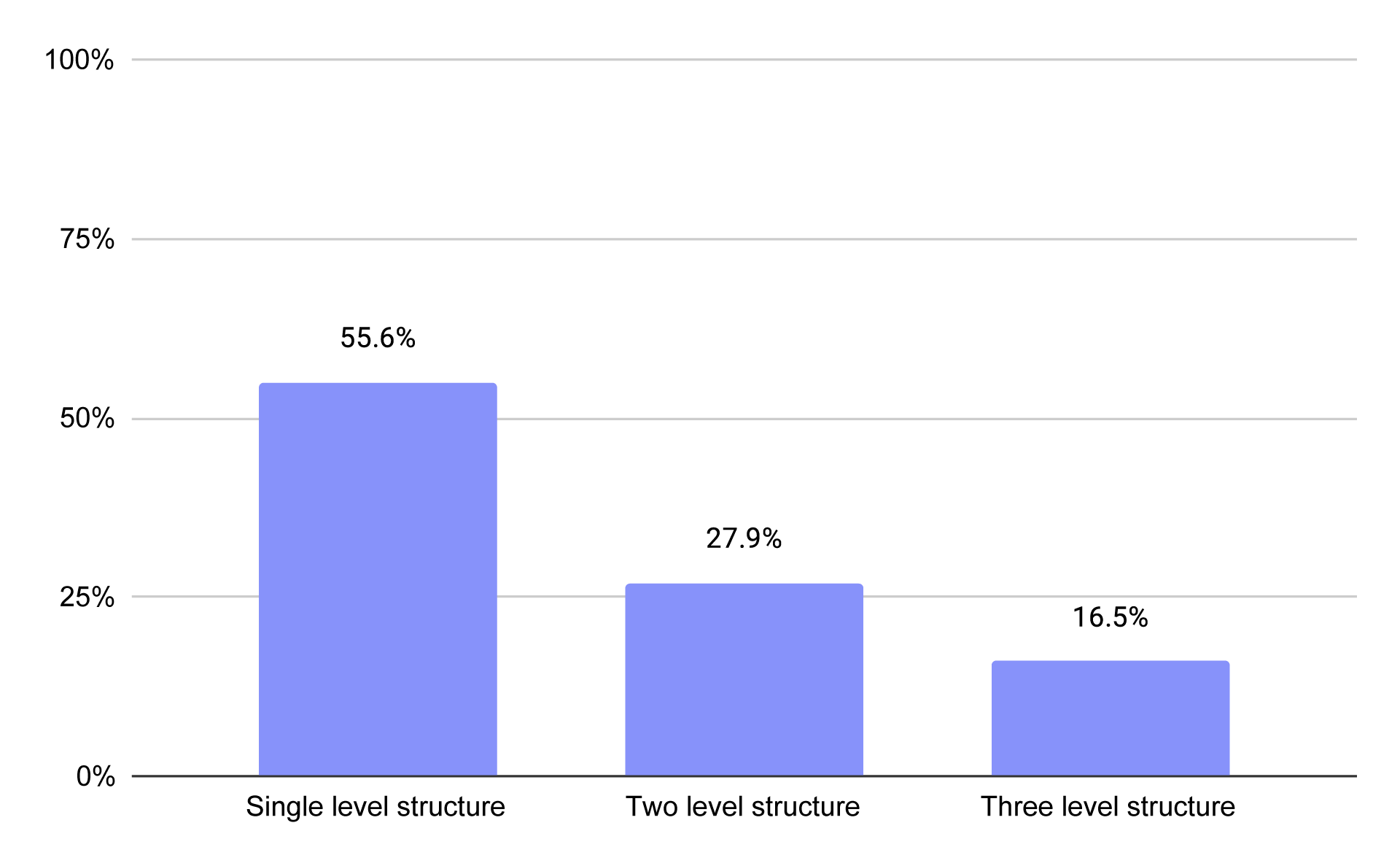
The structure levels in navigation across small business websites in the US
Our research shows that as many as 55.6% of websites have a single-level structure, where all navigation tabs are visible immediately. The remaining sites use multi-level structures, with a two-level structure used by 27.9% of sites and a three-level structure used by 16.5%.
While complex navigation systems are the standard on e-commerce websites, making it easier to organize thousands of products, two-level layouts are surprisingly common on service-oriented websites. As many as 47.2% of such sites feature a two-level layout, allowing them to convey more content and present their offered services in greater detail.
Scroll behavior of the bar
When it comes to scroll behavior, small business websites are nearly evenly divided between two main approaches.
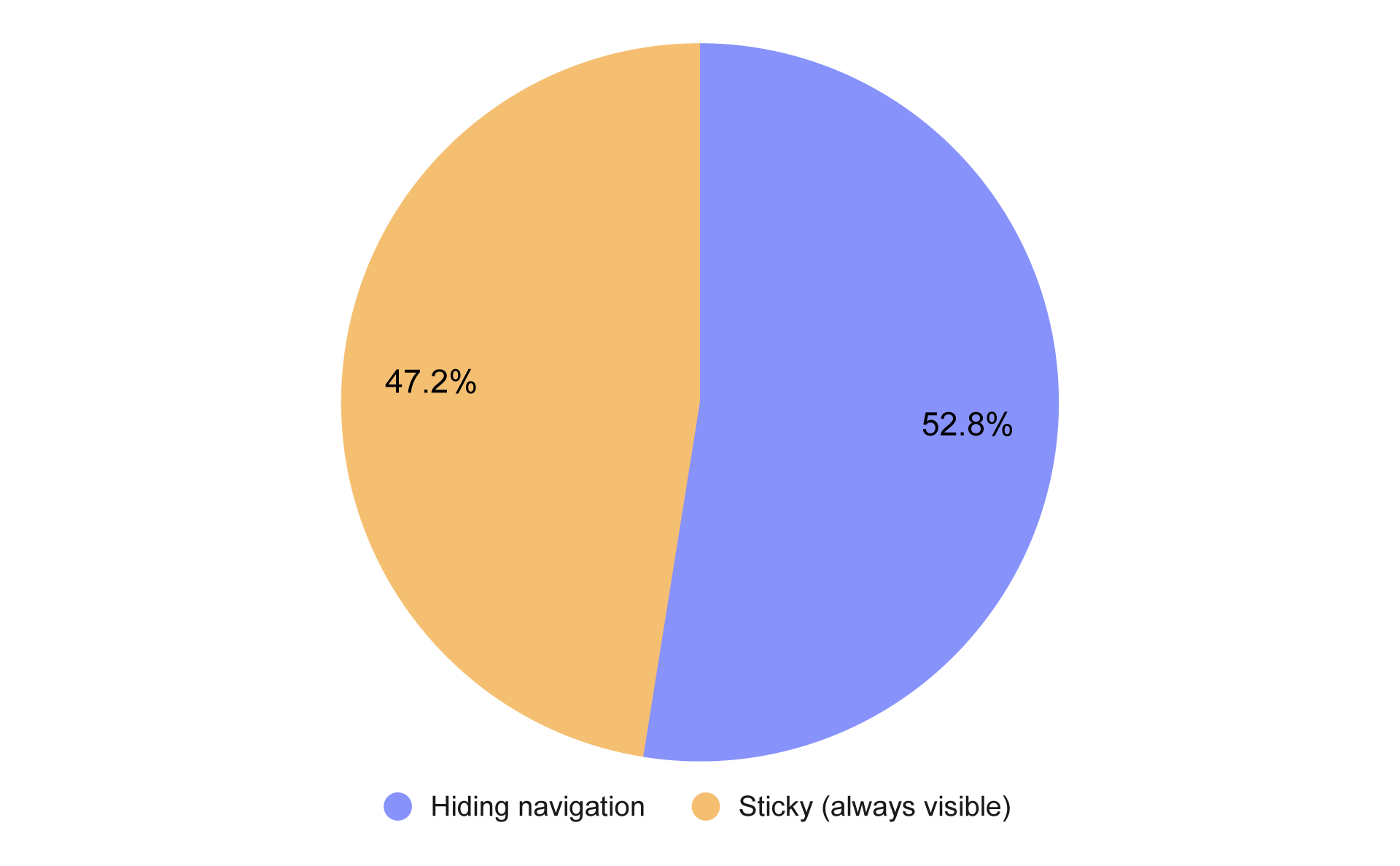
Distribution of navigation display behavior on scroll across small business websites in the US
Hiding the navigation is used on 52.8% of websites. This means that as visitors scroll down the page, the navigation disappears and only reappears once they return to the very top.
In contrast, navigation that is Sticky (always visible) makes up 47.2%. This allows the user to have constant and immediate access to navigation elements, regardless of their position on the current page.
Elements in navigation
In the navigation, besides traditional links, other key elements also appear that make it easier for users to move around the site and serve various functions.
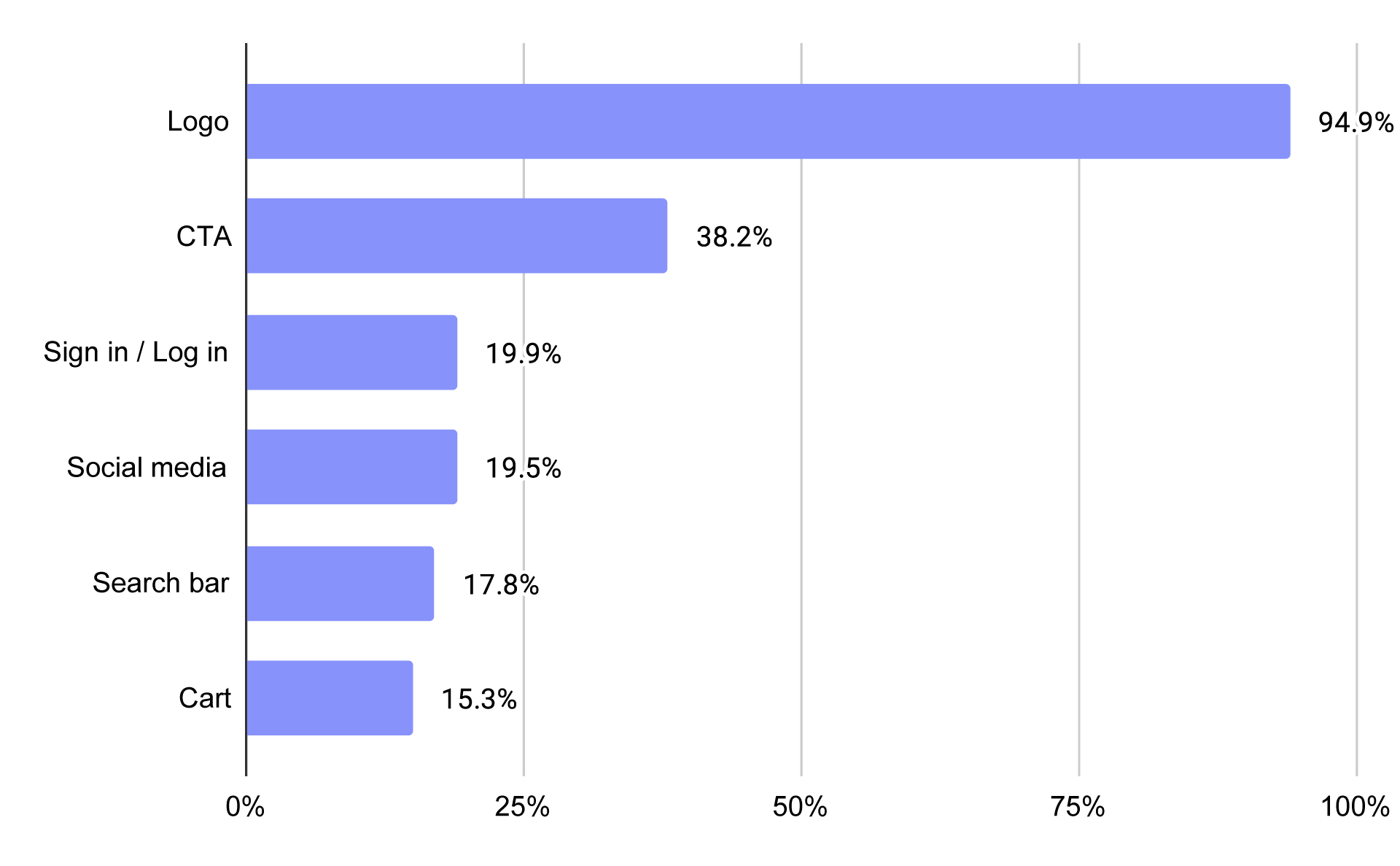
Elements in navigation across small business websites in the US
Logo
The logo is the most common element, appearing on 94.4% of sites. It is often the first thing users notice when visiting a page. It instantly builds brand association, allows users to identify the company, and helps them understand what the business does. In modern standards, clicking the logo also very often serves as a shortcut back to the homepage.
CTA
A CTA, or call to action, is an element on a website that guides visitors toward a specific action. When a CTA is placed in the navigation, it shows users what their next step should be after exploring the page content.
Statistics show that 38.2% of tested websites do include a CTA in their navigation. This low number happens because many business owners prefer to focus solely on standard subpage links, missing out on how important it is. You can learn more about CTAs in our detailed blog.
User account (Sign in/Log in)
A 'Sign Up' or 'Log In' button appears in the navigation of 19.9% of websites. This is especially common in ecommerce, where it is present on 67.3% of sites primarily because user accounts let customers save items, track orders, and speed up checkouts, compared to only 13.2% of service businesses where accounts are primarily used for managing bookings or client portals.
Social media
Buttons leading to social media profiles, like Facebook or Instagram, appeared on 19.5% of pages. This is usually a good practice for businesses that need to share frequent updates or actively engage with their audience. However, it would be a major mistake to link to social media profiles that have been inactive for a long time, and placing them in the primary navigation risks driving users away from your site before they convert.
Search bar
The search bar appeared on only 17.8% of all pages. This is because most pages try to be as simple as possible and not overwhelm users with a multitude of pages. The search bar is mainly useful for very large sites containing many pages, e.g., e-commerce sites, where the presence of search bars is as high as 69.6%.
Cart
The presence of the cart on only 15.3% of pages is not surprising, as it is a standard only in e-commerce where its role is crucial, and as many as 79.5% of e-commerce sites feature it. The cart gathers all products chosen by the user, allowing for an immediate summary and total price check.
So, what should navigation look like?
Just because some solutions are popular doesn't always mean they are correct. Based on our research and best practices, your navigation should be structured as follows:
- Item Count: Most of the websites we researched had up to 6 items in the main menu, which is the ideal length for UX standards. To stick to this standard, your main menu should be kept as simple as possible to help users immediately find what they are looking for.
- Call to Action (CTA): Only
38%of websites had a CTA in their navigation, yet some studies show that placing one can improve sales by as much as25%. Whether it's a simple contact button or a booking link, it's worth considering adding one or two in your navigation. - Multi-Level Structure: In situations where you have many pages and don't need to put them all in the main navigation, you should use a multi-level structure that allows you to convey more content in a way that doesn't overwhelm the user. Of course, as an e-commerce business with many products, a multi-level structure should be the standard.
- Shopping Cart: Carts appeared on nearly
80%of e-commerce websites, so if you run one, the cart will be an essential element that you must include. - Social Media & Search: Placing social media icons in the menu is rare, so if your space is crowded and social media isn't core to your business, it's better to skip them. The same goes for the search bar; if your site isn't huge and doesn't feature a massive inventory, a search bar is unnecessary.
- Mobile Responsiveness: Most web traffic today comes from smartphones, so keep this in mind when creating your site. Make sure your mobile navigation and its elements are properly adapted for the mobile view.
Frequently asked questions
Why is website navigation so important?
Navigation is the primary way for users to comfortably move around a website. Without it, they would struggle to go beyond the homepage and find the details they are looking for. Without proper navigation, users would most likely abandon the site before converting.
What is the difference between single-level and multi-level navigation structures?
With a single-level menu, all options are visible right away. With a multi-level menu, some options are hidden until you click or hover over them. Our research shows that most of the businesses we studied use a single-level menu. Multi-level menus are mostly used by online shops and more complicated service websites.
Should navigation be "sticky" (always visible when scrolling)?
Our research shows that businesses are almost evenly split between using sticky navigation and hiding the menu when users scroll. Sticky navigation is worth considering if you want users to have constant access to key options, such as a shopping cart or a CTA, without having to scroll all the way back up.
Is it worth placing a CTA button in the navigation?
Some studies show that placing a CTA in the navigation can increase sales. Therefore, it is definitely worth doing, even though fewer than half of the companies we analyzed actually include one.
Should you include a search bar and social media icons in the main menu?
Usually, this is not necessary. Social media icons can unnecessarily distract users and lead them away from your site, while a search bar is primarily needed on very large websites (such as e-commerce stores).
Conclusion
Proper navigation is crucial not only for helping users understand the purpose of your site, but also for turning them into paying customers.
By making sure your menu doesn't overwhelm visitors and clearly points the way, you build a foundation for the success of your entire business.
That is where IKOL makes things easy. With IKOL, you can quickly set up your navigation and add helpful buttons or a shopping cart. It gives you a simple, all-in-one solution that lets you manage your business and clients, helping you grow without any worry.
👉Try IKOL for free👈 and see how simple it is to build a website with great navigation!