Image Optimization for Web: A Guide for Small Business Websites

Image optimization for the web is a balancing act. You need images to create an engaging, visually appealing website, but they also bring a whole set of technical challenges that need to be addressed through optimization. In our analysis of more than 3,000 small business websites, we looked at how businesses handle image formats, compression, responsive sizing, lazy loading, alt text, and image sources. This guide breaks down what we found, points out common mistakes, and offers practical tips to help you get the most out of the images on your website.
What is the best image format for web?
WebP - or AVIF, if you’re feeling adventurous. This might sound controversial, but some image formats are better suited for the web than others. More specifically, there are next-gen formats and legacy formats.
Next-generation formats are newer image file types designed to deliver better performance on the web compared to older formats.
The two most common examples are WebP and AVIF.
WebP - The workhorse of modern web design. It supports both lossy and lossless compression, handles transparency like PNG, and supports animation like GIF. It’s an excellent primary format because it can produce files roughly 30% smaller than JPEG at comparable quality, while enjoying near-universal support in modern browsers.
AVIF - One of the most advanced raster image formats available today. It typically produces files 20% to 50% smaller than WebP and roughly half the size of standard JPEGs at comparable visual quality. It’s not as widely used as WebP, partly because it arrived later and can require more computationally intensive encoding.
Legacy formats include the familiar classics:
- JPEG - A classic loved by many, but one with a significant limitation: it doesn’t support transparency.
- PNG - Another classic. Unlike JPEG, it supports transparency and uses lossless compression.
- GIF - A bulky, outdated format that supports simple animations, essentially displaying a sequence of images like a digital flipbook. It was once a popular choice for web animations.
Which image formats are most common on small business websites?
As of 2026, WebP is the most common image format on small business homepages, making up 41.9% of the images we analyzed. JPEG is still widely used, though, accounting for another 33.6%.
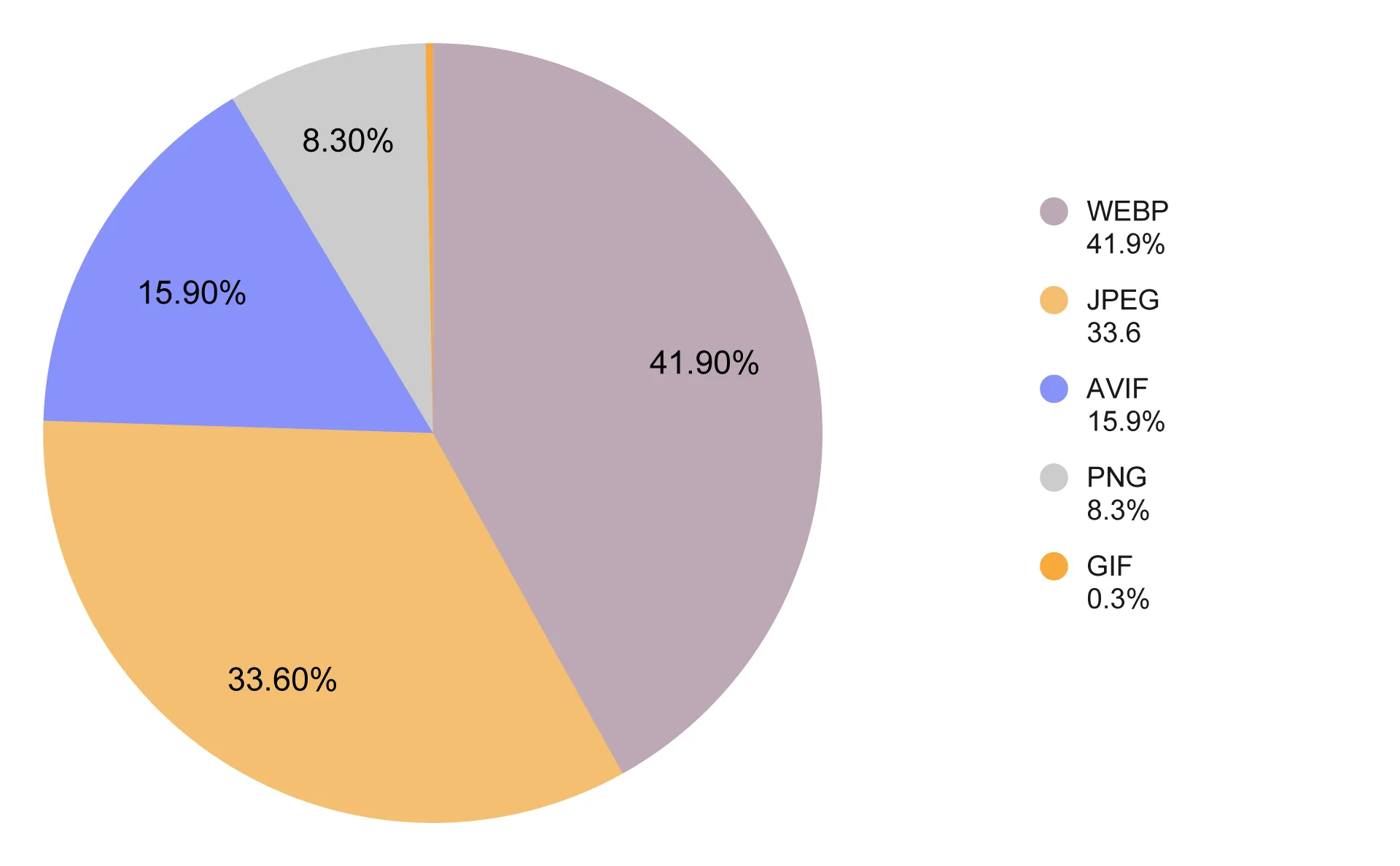
Share of images in each format across the small business websites we analyzed.
The modern AVIF format accounts for 15.9% of website images. PNG makes up 8.3%, while GIF accounts for just 0.3% - fortunately.
Together, next-gen image formats account for 57.8% of images on small business websites. So there’s still plenty of room for improvement.
The role of automatic image format optimization in website builders
It’s worth looking at how the website builder a business uses affects the share of images in each format. There are two common approaches: some website builders automatically optimize the format of images uploaded by users, while others don’t.
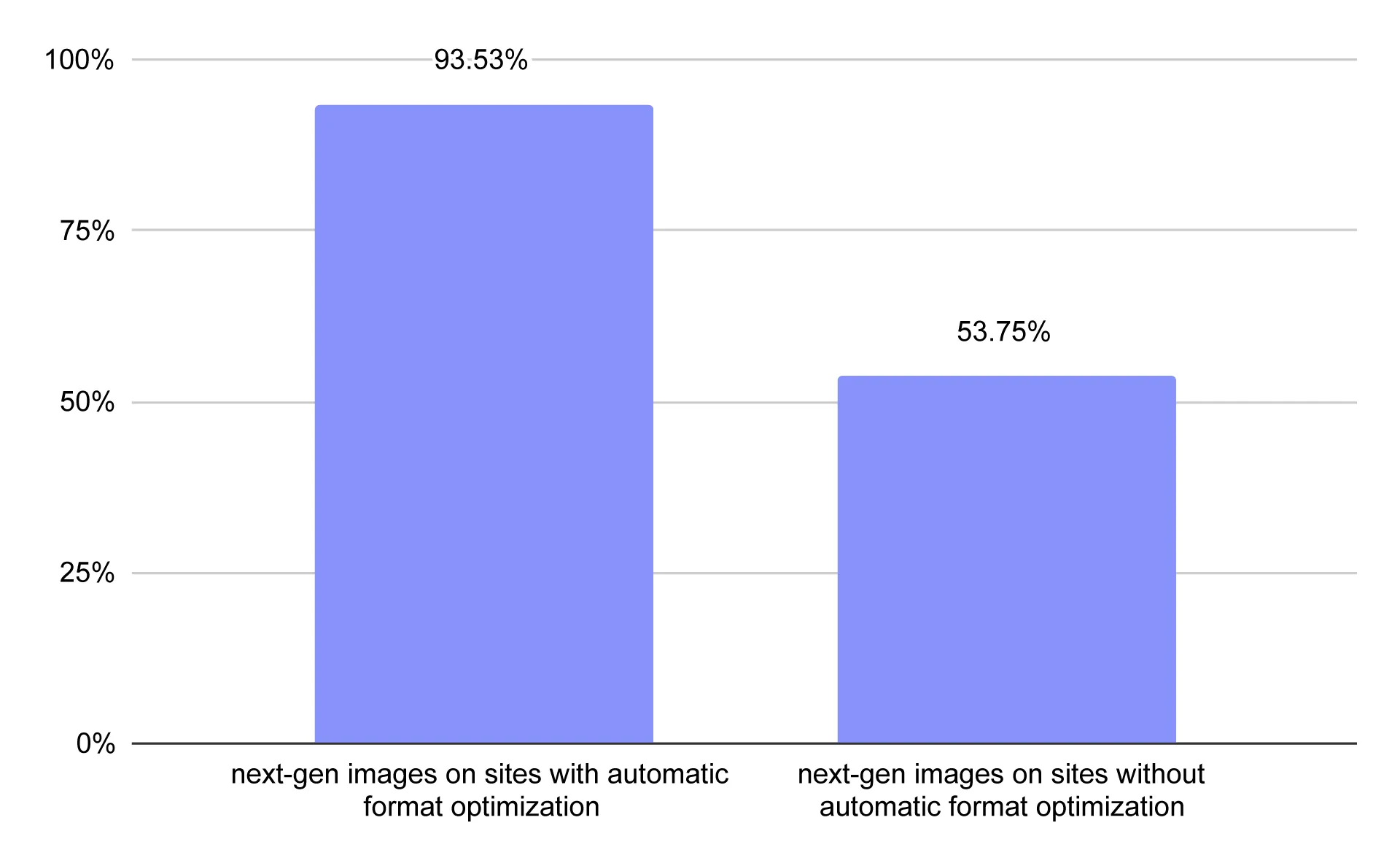
Share of images in next-gen formats (WebP and AVIF) on small business websites using builders with and without automatic image format optimization.
As we can see, the results vary significantly. Websites built with platforms that don’t automatically optimize image formats had 53.75% of their images in next-gen formats. On websites built with platforms that do, the figure reached 93.53%.
That’s a substantial difference. It suggests that automatic image format optimization by website builders can have a major impact on the formats used across the websites they power.
But why didn’t WebP and AVIF account for 100% of images on websites built with platforms that automatically optimize formats?
Most often, it’s because some images bypass the optimization process. These may include external files embedded directly from another server or images loaded through custom components. For example, on the Squarespace websites we analyzed, the only images that weren’t in WebP format appeared in the service booking component.
Sometimes, not all source formats are supported either. A platform might optimize JPEG and PNG files but handle SVG or GIF files differently. We even found websites where almost every image was in WebP, except for a single SVG - such as a search icon.
What is web image compression and why it’s important?
Image compression is the process of reducing an image file’s size without significantly compromising its visual quality.
For images on the web, proper compression is essential because file size has a direct impact on website performance, loading speed, and bandwidth usage. In general, the smaller your website’s image files, the better.
How much do images weigh on an average small business website?
According to HTTP Archive data, the median homepage contained around 1.06 MB of images on desktop in 2025. We compared this figure with the small business websites in our US sample, where the average homepage contained 1.219 MB of images.
As we’ve already seen, however, a lot depends on how the website builder handles image optimization.
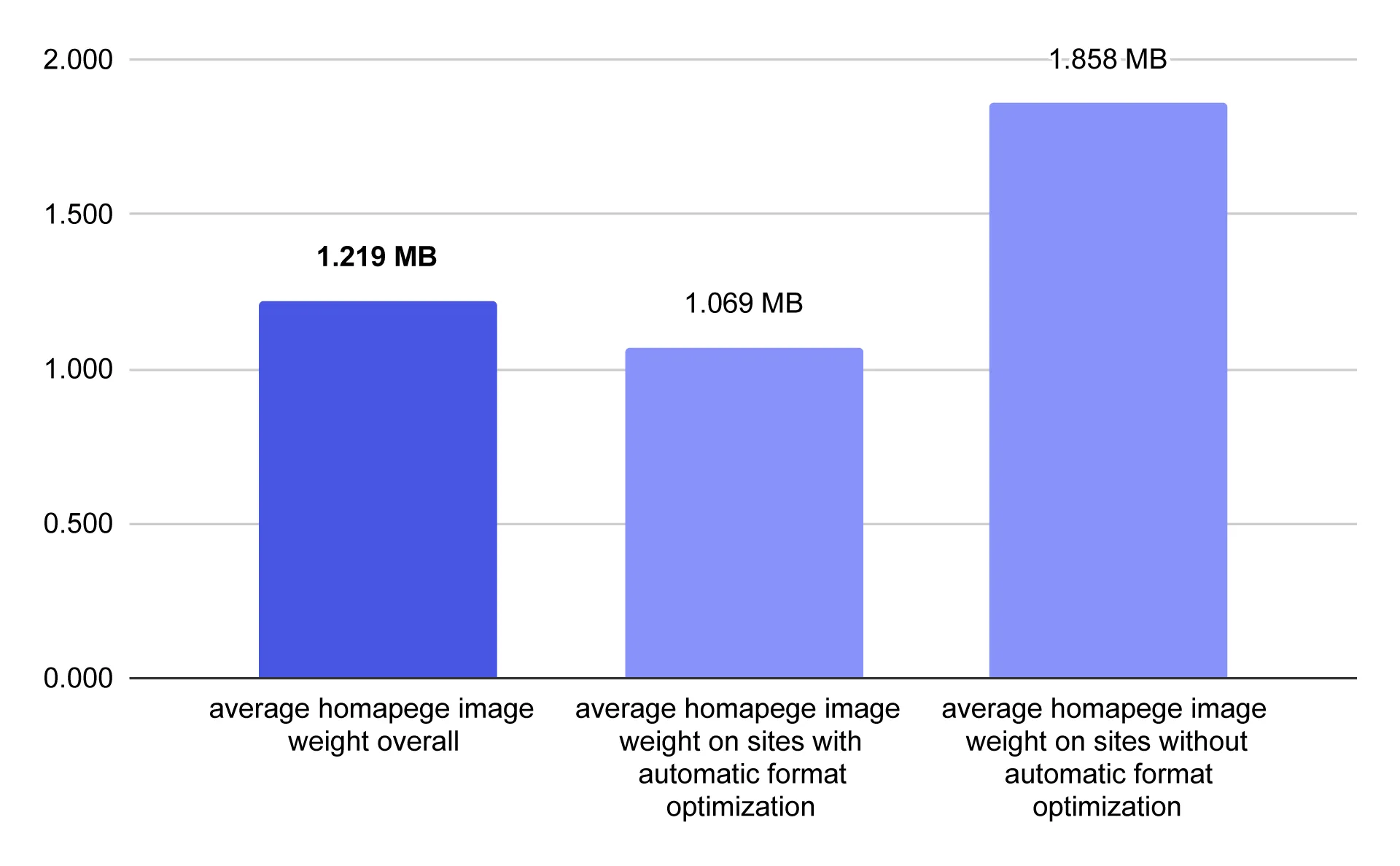
Average homepage image weight by whether the website builder automatically converts images to next-gen formats.
Websites built with platforms that automatically generate WebP or AVIF versions of user-uploaded images had an average homepage image weight of 1.069 MB - very close to the figure reported in the HTTP Archive data. By contrast, websites built with platforms that don’t automatically optimize image formats had an average homepage image weight of 1.858 MB.
That’s a substantial difference, highlighting how important modern image formats can be for reducing the amount of data websites need to load.
Of course, homepage image weight also depends on the type of business.
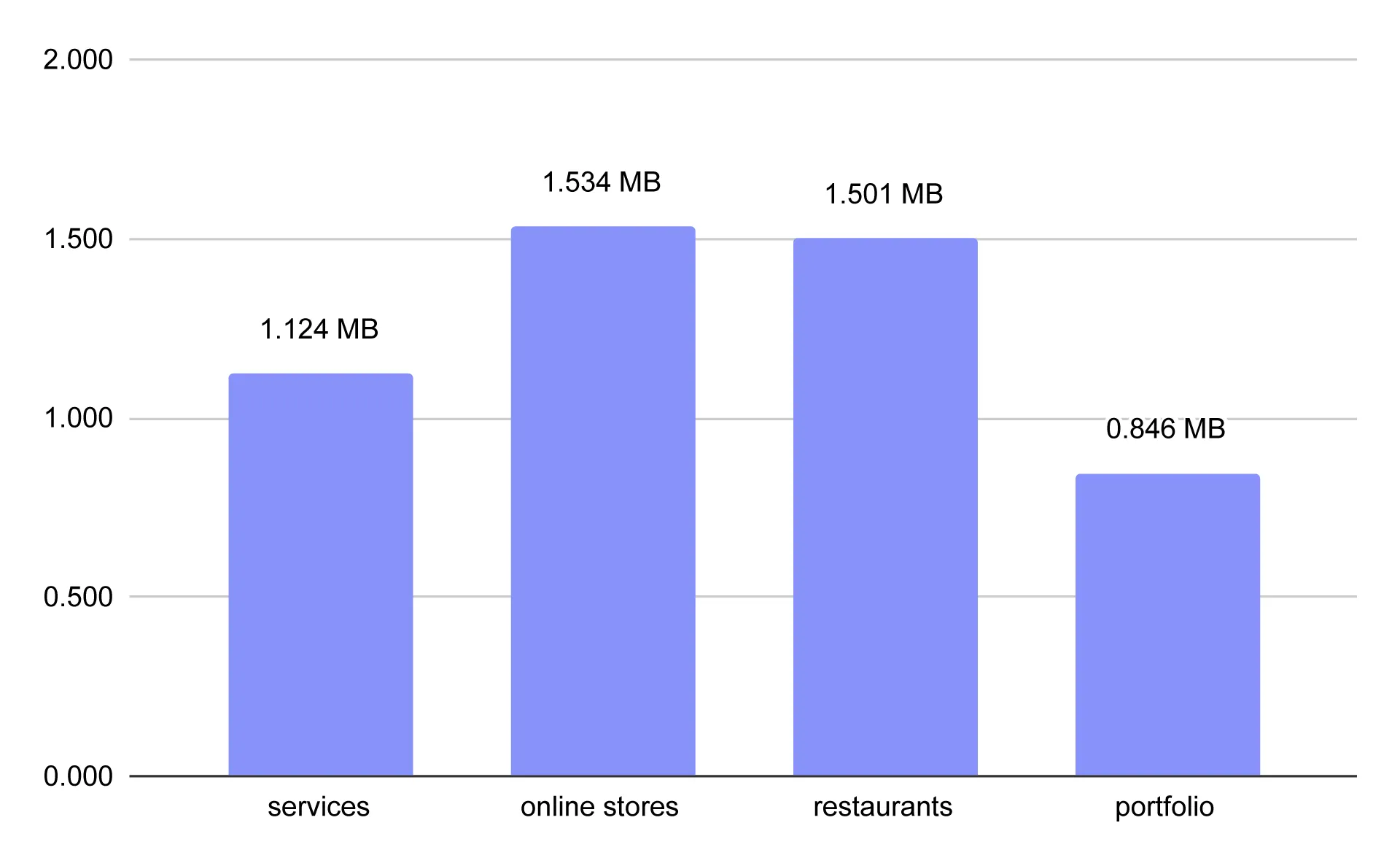
Average homepage image weight by industry.
In our sample, e-commerce websites had the heaviest homepages, with an average image weight of 1.534 MB. Restaurants came in a close second, at 1.501 MB. Both industries typically rely on plenty of photos to showcase their offerings and encourage customers to buy.
Homepages belonging to service businesses averaged 1.124 MB of images. The lightest were portfolios and personal websites, at just 0.846 MB on average.
This result might be surprising, since portfolios are often associated with image-heavy websites. One possible explanation is that portfolio homepages tend to be shorter and less focused on scrolling, serving instead as hubs that direct visitors to dedicated project pages. Another possibility is that people who build visually focused portfolios are more familiar with image formats and sizing, making them less likely to use unnecessarily large files.
What is the best image size for mobile websites?
The smaller an image file, the better - at least when it comes to loading speed. And generally, smaller images weigh less. However, serving images that are too small can result in poor sharpness and make your website look unprofessional.
Images should be served at dimensions appropriate for the width at which they’re displayed. This helps optimize loading speed and reduce bandwidth usage. If a website displays an image at 400 px wide but downloads a 2,400 px-wide file, it transfers far more data than necessary, potentially slowing down the page.
So what size should website images be if pages can be viewed on screens of many different sizes?
There’s no single ideal size. To serve images at the right dimensions, websites need to provide different versions for different viewport widths. There are two main ways to do this:
1. Using srcset and sizes - letting the browser choose
The server provides several versions of an image at different widths. The website builder includes their URLs in srcset and uses sizes to describe the image’s expected display width within the layout. The browser then selects an appropriate version based on factors such as the display width and device pixel ratio (DPR).
2. Automatic resizing on the server or CDN
The system generates an appropriately sized image variant based on its intended display dimensions, such as the display width and DPR. It can then cache the generated file to avoid processing the same image again with every request.
Either way, the goal is the same: the browser should display an image variant suited to the available display width and DPR (device pixel ratio).
Do small business websites serve images at the right size?
Overall, 71.8% of images on the websites we analyzed were served at the appropriate size.
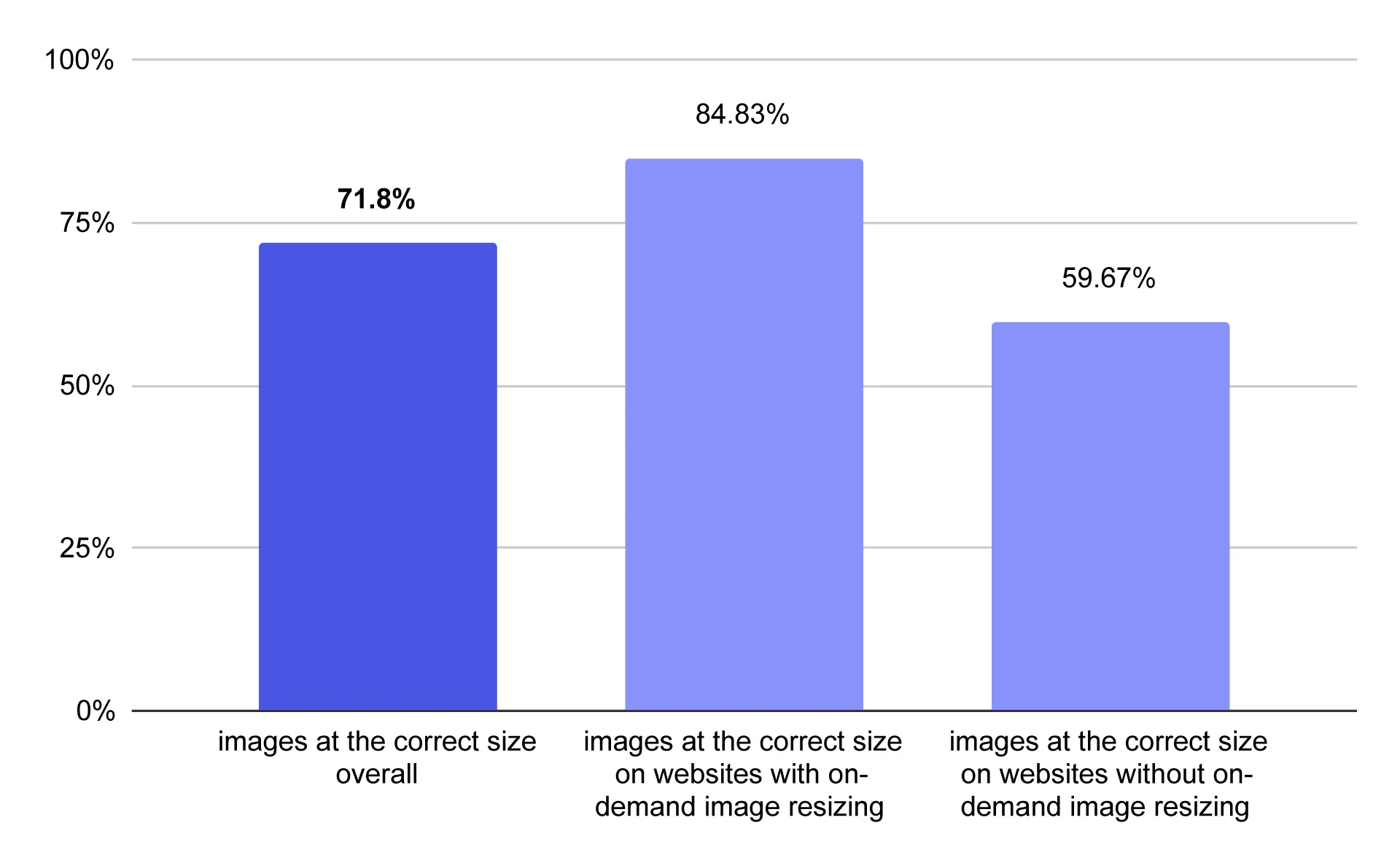
Percentage of images served at the appropriate size on desktop across the small business websites analyzed
The results varied depending on how image resizing was handled. On websites with on-demand image resizing, 84.83% of images were served at the appropriate size. On websites without this feature, the figure dropped to 59.67%.
Does your website need lazy loading?
Lazy loading is a technique that prevents a website from downloading all its images at once. Instead, images are loaded as the user approaches the part of the page where they appear.
Lazy loading can be enabled by adding the loading="lazy" attribute to an image in HTML.
As a general rule, images visible in the initial viewport — and potentially those just below it — should load immediately. Other images further down the page should use lazy loading.
How many small business websites use lazy loading correctly?
Only 33.7% of small business websites used lazy loading correctly, applying it only to images below the fold.
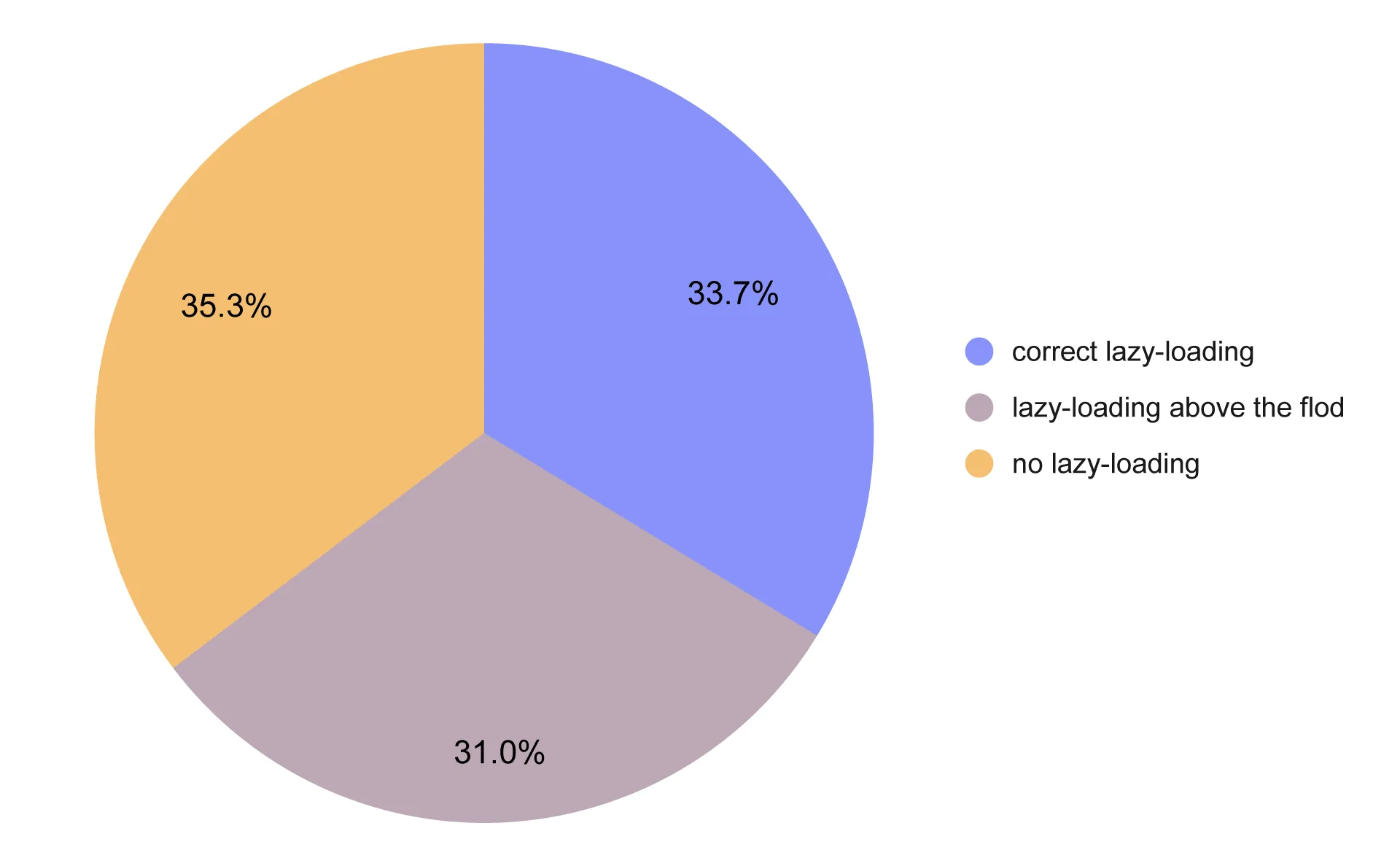
Share of images with correctly implemented lazy loading, incorrectly implemented lazy loading, and no lazy loading
Another 31% used lazy loading incorrectly, delaying the loading of images above the fold. The remaining 35.3% didn’t use lazy loading at all.
There are situations where this isn’t necessarily a mistake. For example, a website might have only one image in its hero section, which should load immediately rather than be delayed by lazy loading. However, homepages typically contain images further down the page as well. This means that many websites that don’t use lazy loading at all are likely missing an opportunity to improve loading performance.
What is alt text for images?
Alt text is the alternative text assigned to an image on a website. Its purpose is to convey the information visitors should get from an image if they can’t see it.
What does alt text affect?
- Accessibility for people with visual impairments - Screen readers read alt text aloud to blind and visually impaired users. Without it, users may not understand what an important image shows. For decorative images, an empty alt attribute helps avoid unnecessary announcements.
- SEO and Google Images - Google uses alt text alongside image recognition algorithms and page content to understand what an image depicts. A good description can help an image appear in more relevant search results.
- How AI systems interpret page content - Alt text provides additional textual information about an image that various systems processing web pages may use. However, it doesn’t guarantee that a page will be cited in AI-generated answers or rank higher in search results.
Alt text should vary depending on the type of image.
- Informative images (products, project results, interiors) - concise descriptions of what the image actually shows.
- Decorative images (such as background images) - an empty alt attribute.
- Images that function as links or buttons - alt text that communicates the purpose of the action rather than simply describing the image.
- Charts, diagrams, and infographics - a description of what the graphic presents. If it contains a lot of data, don’t try to squeeze everything into the alt text; a summary of the main point may be enough.
How long should alt text be? There’s no universal character limit, but alt text should be concise, usually a single sentence. In practice, that often means fewer than 120 characters.
How many small business websites use alt text correctly?
We analyzed alt text across small business websites in the US and identified the following categories:
- Meaningful alt text - 55.39%: Alt text that usefully describes the image.
- Empty alt text - 26.18%: Images with an alt attribute but an empty value. This is appropriate for decorative images, although not necessarily for informative ones.
- Not meaningful alt text - 1.53%: Generic or unhelpful values, such as “image" or meaningless strings of characters.
- Filename-like alt text - 9.57%: Alt text that simply repeats the file name, often adding little useful information. Examples include “IMG_1545" and “Slide5.jpg."
- Missing alt text - 7.34%: No alt attribute in the HTML. In this case, a screen reader may use the file name instead, which often provides little useful information.
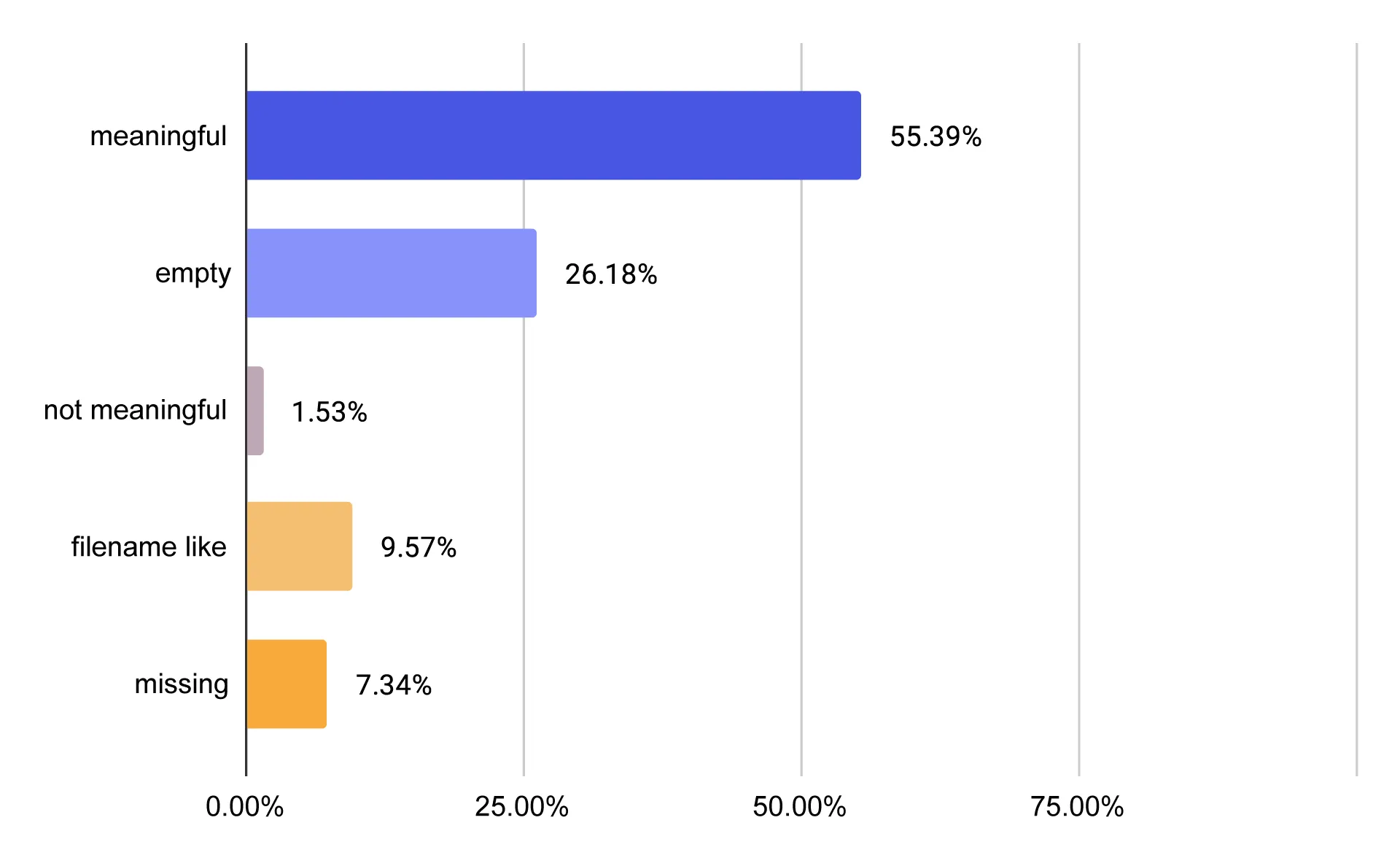
Share of images with meaningful alt text, empty alt text, and problematic alt text on US small business websites.
How does your website builder affect alt text?
As with other aspects of image optimization, website builders appear to play a significant role.
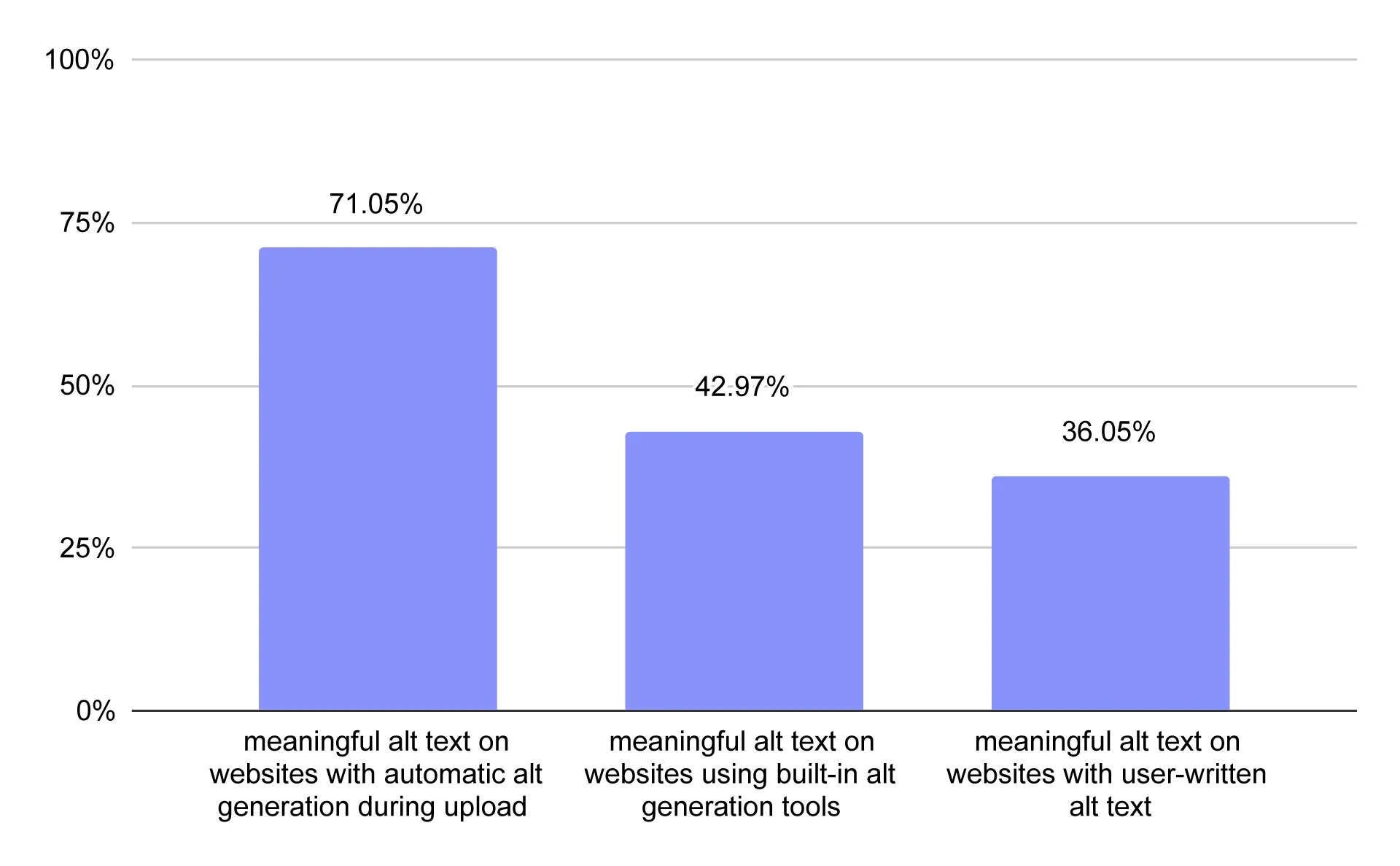
Percentage of images with meaningful alt text by alt text management approach.
Website builders use different approaches to alt text. We identified three main strategies:
- Automatic alt text generation during upload — Websites using builders with this feature had meaningful alt text on 71.05% of images.
- A separate tool that suggests alt text improvements — Websites using builders with this type of tool had meaningful alt text on 42.97% of images.
- Manual editing only, with no generation or quality-checking tools — On websites using these builders, just 36.05% of images had meaningful alt text.
Once again, the results suggest that the more website builders do to support image optimization automatically, the better the outcomes.
Where to get images for your business website?
In the past, the main question was whether to use stock photos or your own images on a business website. Today, the question is increasingly whether to use AI-generated images.
As usual, the answer is: it depends. But first, some good news.
Search engines don’t automatically penalize websites for using AI-generated images. And according to a 2026 study by Nielsen Norman Group:
Using AI-generated images did not significantly affect trust in the businesses that used them.
That’s encouraging news for small businesses. Of the three main image sources - your own photography, licensed stock images, and AI-generated images - AI can be one of the easiest and often cheapest ways to create visuals for your website.
Business owners are already taking advantage of this. According to a 2026 Network Solutions survey:
73% of small business owners use AI for image generation.
41% of small business owners with a website have generated images for it.
However, as with any tool, AI-generated images should be used thoughtfully. Here are some situations where you should avoid using them on your website.
- Showing the results of your work - a portfolio featuring completed renovation projects or hairstyles should contain real photos of your work.
- Presenting a specific product - use authentic product photography so customers can see what they’re actually buying.
- Showing real places or people - hotel or restaurant guests won’t be happy if the actual interior looks different from the images on your website. Similarly, visitors may lose trust if your team looks nothing like the AI-generated people shown online.
- When AI can’t produce a convincing result - anatomical errors, incorrectly constructed objects, and nonsensical text can make images look highly unprofessional. In these cases, use real photographs instead.
In short, avoid AI-generated images when you already have good-quality real photos or when authenticity is essential to what you’re presenting.
Also, check the legal requirements for using and labeling AI-generated images in the places where your business is registered or operates. If you use stock photography, make sure you obtain images legally and comply with the relevant license terms.
A checklist for image optimization for web
To check whether your website images are properly optimized, make sure you:
☐ Use next-gen image formats such as WebP or AVIF.
☐ Serve images at dimensions appropriate for the screen’s display width and device pixel ratio (DPR).
☐ Configure lazy loading correctly.
☐ Provide appropriate alt text for images.
There’s an even shorter version of this checklist:
☐ Use a website builder that takes care of image optimization for you.
If you’re just getting started with your business website, choose your website builder carefully. Not every platform automatically optimizes the images used on your site. At IKOL, we’ve made sure that images are optimized regardless of the format or dimensions in which they’re uploaded.
FAQ
How do I reduce image file size without losing quality?
Use WebP or AVIF where appropriate, compress images before uploading them, and avoid uploading files that are much larger than their displayed dimensions. The goal is to reduce file size while keeping the image visually clear.
Should I use lazy loading for all website images?
No. Lazy loading is generally appropriate for images farther down the page that do not need to appear immediately. Important images visible when the page first loads, especially the main hero image, should not be lazy-loaded because this can delay their display.
Do all website images need alt text?
Informative images should have short descriptive alt text that communicates their relevant content. Decorative images should generally use an empty alt attribute (alt=""), while linked images should describe the link's purpose.
Are AI-generated images good for business websites?
AI-generated images can be useful for illustrations, decorative graphics, and concepts that are difficult or expensive to photograph. However, real photos are usually a better choice when customers need to see actual products, staff, locations, or completed work. Businesses should also check applicable disclosure requirements and image usage rights.
Does image optimization improve SEO?
Image optimization can support SEO by helping pages load efficiently, improving accessibility through appropriate alt text, and helping search engines understand image content. It does not guarantee higher rankings; results also depend on other aspects of the website and its content.
Which image formats support transparency?
PNG, WebP, AVIF, and GIF can support transparency, although GIF is limited to simple, on-or-off transparency. JPEG does not support transparency. For most website images that need a transparent background, PNG is a widely compatible option, while WebP and AVIF can offer smaller file sizes. Choose a format supported by your website platform and target browsers.
Why do website images look blurry?
Website images can look blurry when the original file is too small for the space it fills, when the browser enlarges a low-resolution image, or when compression removes too much detail. Images can also appear blurry on high-density screens if they are served at insufficient resolution. Use a sufficiently large source image and make sure your website serves an appropriate version for the displayed size and device pixel ratio.
How can I make website images load faster?
Start by reducing image file sizes without noticeably lowering quality. Use modern formats such as WebP or AVIF where appropriate, serve images at the dimensions they need, and enable lazy loading for images below the initial viewport. Avoid lazy-loading important images visible as soon as the page opens. A website platform that automatically resizes and optimizes uploaded images can make this process easier.
Do image file names matter for SEO?
Descriptive image file names can help search engines understand what an image shows, but they are only one small part of image SEO. Use short, relevant names that describe the image naturally, such as wooden-dining-table.webp instead of IMG_1234.webp. Avoid keyword stuffing, and remember that useful alt text, relevant page content, and image quality also matter.
Are AI-generated images copyright-free?
Not necessarily. Whether an AI-generated image is protected by copyright, and whether you can use it commercially, depends on the applicable law, how the image was created, the tool’s terms, and whether it incorporates protected material. Check the image generator’s commercial-use terms and avoid prompts or outputs that imitate recognizable copyrighted characters, brands, or specific artists too closely. AI-generated does not automatically mean copyright-free.
Do AI-generated images affect website SEO?
Using AI to create an image does not automatically hurt a website’s SEO. What matters more is whether the image is relevant to the page, provides a good user experience, and is optimized for performance. Avoid misleading visuals, use descriptive alt text when an image conveys meaningful information, and make sure large image files do not slow down the page. AI-generated images should support the page’s purpose rather than exist solely to manipulate search rankings.